

Wondering if 25% on Turnitin is too high? Learn what similarity scores mean, how AI detection works, and how to interpret your report before submitting.
Is 25% on Turnitin Too High? Understanding Similarity Scores in 2026
You just submitted your assignment. The screen refreshes. And there it is: 25% similarity on your Turnitin report.
Your stomach drops. You start Googling frantically. Is 25% on Turnitin too high? Will your professor fail you? Should you rewrite the entire paper?
Take a breath. That number on your screen is not a verdict. It is a signal, and signals need interpretation. In 2026, Turnitin works differently than most students assume, and understanding what that 25% actually means can save you from unnecessary panic.
This guide breaks down everything you need to know about Turnitin similarity scores, what triggers flags, how AI detection fits into the picture, and what you can do before hitting submit.
What Does a 25% Turnitin Score Actually Mean?
A 25% similarity score means that one-quarter of your submitted text matches content already stored in Turnitin’s database. That database includes billions of web pages, academic journals, previously submitted student papers, and published books.
Here is what most students miss: Turnitin does not detect plagiarism. It detects similarity. The tool compares your text against its database and highlights matches. It cannot tell if you cited a source correctly or copied it without attribution. That judgment call belongs to your instructor.
According to Turnitin’s own documentation, the similarity index simply measures how much text overlaps with existing sources. A 25% score could come from properly cited quotations, standard academic phrases, reference lists, or common terminology in your field. It could also come from uncited copied text. The percentage alone does not tell you which.
Is 25% on Turnitin Too High? The Real Answer
The honest answer: it depends.
Most universities consider 0-15% similarity excellent, 16-25% acceptable, and 26-30% worth reviewing. Above 30% typically triggers closer inspection. So 25% sits right at the upper edge of the acceptable range.
But context matters far more than the headline number. A 25% score spread across 20 different sources at 1-2% each is very different from 25% coming from a single uncited website. Your professor will look at the distribution, not just the percentage.
Turnitin uses color coding to help visualize this:
| Color | Similarity Range | Meaning |
|---|---|---|
| Blue | 0% | No matching text |
| Green | 1-24% | Low similarity |
| Yellow | 25-49% | Moderate similarity, review needed |
| Orange | 50-74% | High similarity, significant concern |
| Red | 75-100% | Very high similarity, major issue |
At 25%, you have crossed from green into yellow territory. That does not mean automatic failure. It means your instructor will likely review the detailed report to see what is driving those matches.
When 25% Is Probably Fine
You are likely in safe territory if your 25% comes from:
- Properly cited direct quotations
- Standard methodology descriptions
- Common disciplinary terminology
- Your reference list or bibliography
- Small matches across many different sources
In subjects like law or medicine, technical language and case citations can naturally push scores higher. A law paper citing multiple case laws might hit 25% without any academic misconduct.
When 25% Raises Red Flags
Your score warrants concern if the report shows:
- One large block of copied text without quotation marks
- Multiple matches to the same single source
- Poor paraphrasing that stays too close to original wording
- Missing or incorrect citations on matched passages
- AI-generated content pasted without substantial editing
Even a 5% score can trigger investigation if it contains one substantial copied paragraph without attribution.
How to Download Your Turnitin Report and Read It Properly
Before you panic about the number, learn how to download your Turnitin report and interpret what it actually shows.
How to Download Turnitin Report with Percentage
After submitting through your university’s learning management system:
- Log into your course portal and navigate to the assignment
- Click on your submission or the similarity percentage shown
- This opens Turnitin Feedback Studio
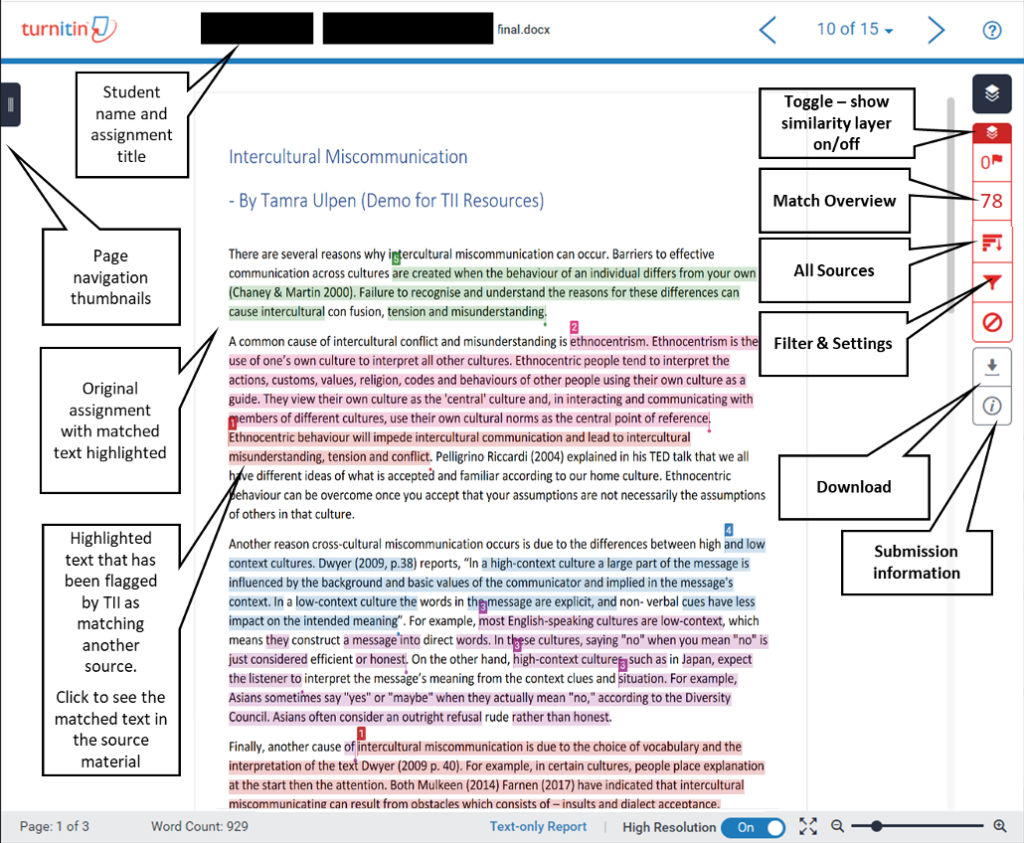
- Click the similarity score in the toolbar to view the Match Overview
- You will see all highlighted matches with source links
How to Download Turnitin Report in PDF
If you need a PDF copy:
- Open your report in Feedback Studio
- Look for the download or print icon in the toolbar
- Select the option to download the similarity report
- Choose PDF format and save the file
Some institutions restrict student access to reports, so if you cannot see these options, contact your instructor.
Using Turnitin Feedback Studio Effectively
Turnitin Feedback Studio is where the real analysis happens. Do not just look at the percentage. Click into each match and ask:
- Is this a properly cited quotation?
- Is this common academic phrasing?
- Is this from my reference list?
- Does one source dominate my matches?
The Match Overview shows exactly which sources your text overlaps with and by how much. This is where you will find the real story behind your 25%.
Turnitin AI Detection: What You Need to Know in 2026
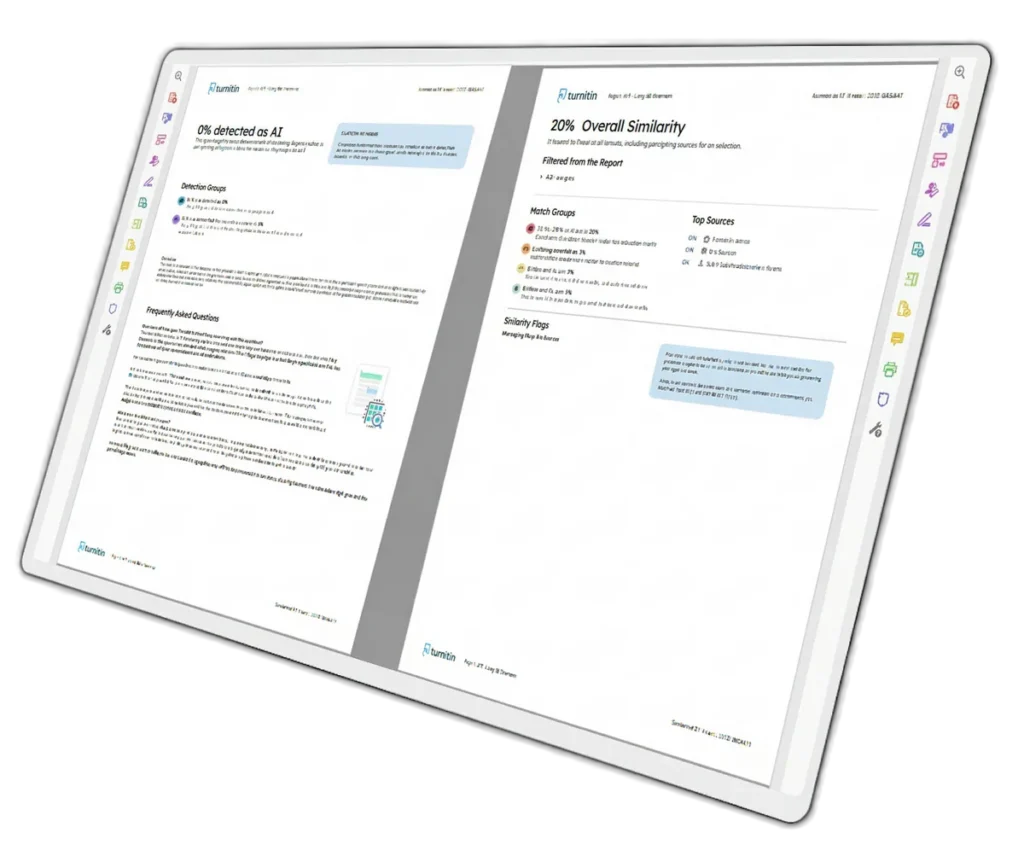
Since 2023, Turnitin has included AI writing detection alongside similarity checking. These are two completely independent scores. You can have 0% similarity and still get flagged for AI writing, or high similarity with no AI flag at all.
How Turnitin Detects AI Content
Turnitin’s AI detector analyzes writing patterns rather than comparing against a database. It looks at:
- Perplexity: how predictable your word choices are
- Burstiness: how much your sentence length varies
- Sentence entropy: the variety of your sentence structures
AI tends to produce uniform sentence lengths, predictable vocabulary, and repetitive transitions. Human writing is messier, more varied, and less predictable.
Turnitin breaks documents into approximately 300-word segments and classifies each as human or AI. Your final score reflects the percentage of segments flagged as AI-generated.
Can ChatGPT Be Detected by Turnitin?
Yes. Turnitin can detect ChatGPT-generated content, particularly raw, unedited output. Detection rates for GPT-4 content range from 85-92% when the text is submitted without modification.
However, detection accuracy drops significantly when content is heavily edited, rewritten, or processed through quality humanization tools. Lightly edited AI text may still score 60-70% AI probability, while thoroughly rewritten content can drop to under 15%.
Can Turnitin Detect AI If I Paraphrase?
This is where it gets tricky. If you use AI to paraphrase content but the output retains AI phrasing patterns, Turnitin will likely still flag it. The detector recognizes the underlying statistical patterns of AI-generated language, not just the specific words.
That said, genuine manual rewriting, adding personal examples, and varying sentence structure can reduce detection scores substantially.
What Color Is AI Detection on Turnitin?
Turnitin displays AI detection differently from similarity scores. The AI writing indicator appears alongside the similarity report and shows the percentage of text classified as AI-generated. Scores below 20% often display as an asterisk rather than a specific number, as Turnitin suppresses low-confidence predictions to reduce false positive panic.
Is It Possible to Get 0% AI on Turnitin?
Technically yes, but practically it is not necessary. A 0% AI score is not the goal. What matters is keeping your AI probability low enough to avoid triggering review flags. Most institutions treat scores below 20% as acceptable.
If you are wondering how to get a 0% on Turnitin, the honest answer is: write the paper yourself. Use AI for brainstorming and outlining if your institution allows it, but compose the actual text in your own words with your own voice.
How Students Use Turnitin: Access, Login, and Getting Started
Turnitin Login Student
Most students access Turnitin through their university’s learning management system, not directly through Turnitin’s website. You typically log in via:
- Blackboard
- Canvas
- Moodle
- Your institution’s custom portal
Your instructor creates the assignment link, and you submit through that portal. Direct Turnitin accounts are usually reserved for instructors and administrators.
Turnitin Sign Up
Individual students generally cannot sign up for Turnitin independently. Access is provided through your educational institution. If you need to check your work before submission, you have a few options:
- Use your institution’s draft submission feature if available
- Ask your instructor to set up a practice assignment
- Use third-party plagiarism checkers for pre-submission review
How to Use Turnitin Effectively
The smartest way to use Turnitin is as a diagnostic tool before your final submission:
- Submit a draft if your institution allows it
- Review the similarity report carefully
- Identify problematic matches
- Rewrite or properly cite flagged passages
- Resubmit and check again
Never treat your first draft as your final submission. Turnitin is most useful when it helps you improve your paper, not when it surprises you after the deadline.
Common Turnitin Scenarios and What They Mean
Is a 20% Turnitin Score Okay?
Yes, 20% is generally considered acceptable at most institutions. It falls within the normal range for well-researched academic papers that include proper citations and quotations. As with any score, the distribution of matches matters more than the number itself.
What Does a Yellow Turnitin Flag Mean?
A yellow flag indicates 25-49% similarity. This is a caution zone, not a danger zone. Your instructor will likely review the detailed report to determine if the matches are legitimate. Yellow flags often result from extensive bibliographies, multiple quotations, or papers in technical fields with standardized language.
How Do Students Avoid Turnitin Flags?
The best way to avoid flags is to write original work and cite properly. Specific strategies include:
- Paraphrasing by closing the source and explaining ideas in your own words
- Using direct quotations sparingly and always with proper attribution
- Adding your own analysis and critical thinking to every paragraph
- Keeping research notes and drafts to demonstrate your writing process
- Avoiding generic template language that appears in countless papers
Can You Get Caught Using ChatGPT for Assignments?
Yes, you can. Raw ChatGPT output submitted as original work is detected by Turnitin at high rates. However, the consequences depend on your institution’s policies. Most universities do not automatically fail students for AI detection alone. They review the flag, consider your writing history, and may request drafts or a short interview.
The risk increases significantly if you submit unedited AI text without disclosure. Many institutions now have formal AI use policies, and violating them can result in academic misconduct charges.
Which AI Humanizer Passes Turnitin?
Quality humanization tools that restructure sentences, vary rhythm, and remove predictable AI patterns can reduce Turnitin AI scores from 80-90% down to 5-15%. However, no tool guarantees a pass, and using humanizers to disguise AI-generated work may violate your institution’s academic integrity policy.
The safest approach is genuine rewriting. Add personal examples, vary sentence length manually, and inject your own analytical voice. These methods consistently outperform automated tools.
How to Get Turnitin for Free as a Student
Individual students cannot purchase Turnitin directly. Access comes through your institution. However, you have alternatives for pre-submission checking:
- Ask your instructor to enable draft submissions
- Use free plagiarism checkers like Quetext or Scribbr for initial screening
- Check if your library offers access to originality checking tools
- Some writing centers provide Turnitin reports as part of their tutoring services
The key is checking your work before the final submission deadline, not after.
Practical Steps to Improve Your Turnitin Score
If your score is higher than you would like, here is a concrete action plan:
Step 1: Analyze the Report
Open the detailed similarity report. Identify the largest matches and their sources. Determine whether each match is legitimate or problematic.
Step 2: Fix Citation Issues
Any matched text that you borrowed needs a citation. Add in-text references and bibliography entries for every source you used.
Step 3: Improve Paraphrasing
For passages that match too closely to sources, close the source and rewrite from your own understanding. Change the sentence structure, not just the words.
Step 4: Reduce Quotations
If more than 10% of your paper is direct quotation, you are probably over-quoting. Convert some quotes to paraphrased summaries with citations.
Step 5: Add Original Analysis
AI and similarity scores both drop when you add genuine critical thinking. Evaluate sources, compare perspectives, and draw your own conclusions.
Step 6: Check Again
If possible, run your revised draft through Turnitin before the final deadline. Verify that your changes produced the improvement you expected.
Turnitin Document Viewer: Understanding What Your Instructor Sees
When your instructor opens your submission in Turnitin Document Viewer, they see:
- The similarity percentage and color code
- The AI writing detection score
- Highlighted matches with source links
- The Match Overview showing all sources
- Your paper with matched text color-coded by source
They can click any match to see the original source and compare it to your text. This is why hiding problematic matches is impossible. The only solution is fixing them before submission.
Final Thoughts: Should You Worry About 25%?
A 25% Turnitin similarity score is not automatically bad, but it is not automatically safe either. It sits at the boundary where instructors start paying closer attention.
Your best defense is a clean, well-cited paper with original analysis. Focus on:
- Proper referencing for every borrowed idea
- Genuine paraphrasing rather than word-swapping
- Your own voice and critical perspective
- Pre-submission review when possible
Turnitin is a screening tool, not your examiner. It generates data that requires human interpretation. A professor who sees a 25% score spread across properly cited sources will react very differently from one who sees 25% coming from a single uncopied website.
If you want certainty before submitting, consider running your paper through a professional similarity and AI check service. Getting a detailed breakdown before your professor sees it gives you time to fix issues and submit with confidence.
The bottom line: 25% is a yellow light, not a red one. Slow down, check your report, fix what needs fixing, and then proceed.