

1.1 Understanding the Similarity Report Interface
1.1.1 Accessing Feedback Studio from Blackboard
Accessing your Turnitin Similarity Report begins with navigating to the specific Turnitin assignment link within your Blackboard course module. The University of Southampton’s eLearning Support and Resources documentation emphasizes that students must first locate and click the Turnitin assignment link, which triggers the loading of your submitted paper in a new browser window or tab . This architectural design ensures that authentication credentials pass securely between Blackboard and Turnitin’s servers through a token-based single sign-on mechanism, eliminating the need for separate login credentials while maintaining session integrity.
The transition to Feedback Studio—Turnitin’s proprietary document analysis environment—typically requires 5-15 seconds for standard documents under 10MB, though this duration may extend during peak usage periods or for complex submissions. Students should avoid refreshing the page or clicking additional navigation elements during this initialization phase, as premature interruption may corrupt the session state and necessitate re-authentication. The Feedback Studio interface represents a significant evolution from earlier Turnitin implementations, combining document rendering capabilities with layered analytical tools that enable both similarity detection visualization and instructor feedback integration within a unified workspace .
A critical prerequisite for successful access is browser pop-up permission configuration. Feedback Studio launches in a new window rather than embedding within the Blackboard frame, meaning that aggressive pop-up blockers will prevent interface loading. Students experiencing blank screens or failed launches should verify that their browser permits pop-ups from turnitin.com and blackboard.soton.ac.uk domains. This configuration requirement, while seemingly minor, represents one of the most common access barriers reported to institutional IT support services.
1.1.2 Navigating the Three-Panel Layout (Document Viewer, Toolbar, Side Panel)
The Feedback Studio interface employs a deliberately engineered three-panel architectural design that optimizes information density across diverse device form factors. Understanding this layout is essential for efficient navigation and effective use of analytical capabilities.
| Panel | Location | Primary Function | Key Controls |
|---|---|---|---|
| Document Viewer | Center (60-70% of width) | Displays submitted document with formatting preservation | Zoom (50%-200%), scroll navigation, page navigation, text selection |
| Right-Side Panel | Right edge | Contextual tools and information display | Match Overview, similarity score, filtering options, feedback display |
| Toolbar | Top or left edge | Layer switching and global actions | Similarity/Grading layer toggle, download, help, information icons |
The central document viewer preserves original submission formatting including fonts, margins, headers, footers, and embedded visual elements. This panel implements responsive scaling algorithms with intelligent reflow capabilities, ensuring readability across zoom levels. For word-processed documents, continuous scrolling provides fluid navigation through lengthy submissions, while presentation files may trigger page-based navigation controls .
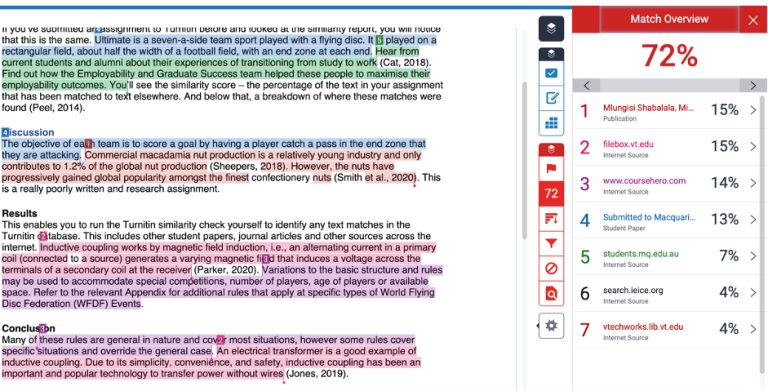
The right-side panel serves as the primary control interface, with content that adapts dynamically based on active layer selection and user interactions. When viewing similarity data, this panel presents the Match Overview with percentage breakdowns by source; when examining instructor feedback, it displays QuickMark categories, rubric scorecards, and general comment fields . The panel’s collapsible design allows students to maximize document viewing area when detailed analytical information is not immediately required.
The toolbar, though less prominently featured in institutional documentation, provides essential layer-switching functionality that enables rapid transitions between similarity analysis, instructor feedback, and clean document views. This layer architecture, detailed in Section 1.1.3, represents one of Feedback Studio’s most powerful and potentially confusing features for new users.
1.1.3 Identifying the Similarity Layer vs. Grading Layer
A critical conceptual distinction concerns the separation between similarity detection and grading feedback functionality, implemented through distinct “layers” that can be independently activated. The Similarity Layer, indicated by red interface elements, overlays the document with color-coded highlighting that indicates text matches to Turnitin’s comprehensive database. This database encompasses billions of web pages, millions of academic journal articles, and an extensive repository of previously submitted student papers . The highlighting system uses distinct colors for different sources, with each unique source assigned a consistent color throughout the document for visual tracking.

Check before you submit. Get Turnitin Score Report in 15 Minutes.
Don't risk the 'Red' score. Get the exact same Turnitin report your supervisor uses. You will receive a full PDF similarity report including AI detection.
The Grading Layer, conversely, employs blue interface elements and contains instructor-generated feedback including QuickMarks (predefined comment categories), bubble comments (freeform annotations), inline text modifications, and voice recordings . This layer’s visibility is typically restricted until the instructor-designated feedback release date, creating a temporal separation between similarity self-assessment and formal evaluation.
| Layer | Color Indicator | Content | Typical Availability |
|---|---|---|---|
| Similarity Layer | Red | Color-coded match highlighting, source identification | After processing completion (may be delayed by instructor settings) |
| Grading Layer | Blue | Instructor comments, marks, rubrics, audio feedback | After instructor completion and release date |
The layer toggle mechanism, positioned in the toolbar and right panel, enables rapid switching between viewing modes without page reloads. Students should develop proficiency in layer management: viewing similarity only for pre-submission revision, grading only for focused feedback review, or both layers for comprehensive understanding of how source usage patterns influenced assessment outcomes. The default layer visibility upon initial loading follows instructor-configured assignment settings, with some courses prioritizing similarity awareness and others emphasizing feedback reception .
1.2 Interpreting Similarity Scores and Color Coding
The color-coded similarity scoring system provides immediate visual classification of originality levels, though students must understand that these classifications represent analytical categories rather than quality judgments. The percentage ranges and associated colors have been standardized across Turnitin implementations, enabling consistent interpretation regardless of institutional context .
| Color | Percentage Range | Interpretation | Typical Student Action |
|---|---|---|---|
| Blue | 0% | No matching text detected | Verify document processed correctly; consider whether adequate source engagement exists |
| Green | 1-24% | Low similarity—typically acceptable with proper citation | Review matches to confirm appropriate attribution; most common outcome for well-referenced work |
| Yellow | 25-49% | Moderate similarity—review recommended | Detailed examination of match patterns; assess citation and paraphrasing adequacy |
| Orange | 50-74% | High similarity—significant revision may be needed | Comprehensive document review; likely requires substantive rewriting or improved attribution |
| Red | 75-100% | Very high similarity—immediate attention required | Urgent intervention; contact instructor; prepare for academic integrity discussion |
1.2.1 Blue (0%): No Matching Text Detected
A blue similarity score indicating 0% matching text requires careful interpretation. While superficially appearing ideal, this result may signal several concerning scenarios. In disciplines requiring extensive literature engagement, a 0% score might indicate inadequate source integration or complete absence of scholarly citation. Alternatively, it could result from submission format issues—such as image-based PDFs or corrupted files—that prevent Turnitin’s text-extraction algorithms from functioning properly .
From a technical perspective, the 0% classification emerges when the document’s textual fingerprint fails to generate statistically significant matches against the indexed corpus. This outcome may occur for: highly specialized topics with limited prior publication; extensive mathematical notation or technical terminology that reduces matchable text segments; or novel terminology and phrasing that has not yet entered the database. Conversely, sophisticated plagiarism techniques including substantial paraphrasing, translation-based appropriation, or extensive quotation masking may also produce artificially low similarity scores.
Students receiving blue indicators should verify that all sources have been appropriately cited according to disciplinary conventions, as the absence of detected similarity does not automatically validate citation completeness. The similarity report should be viewed as a tool for self-assessment rather than definitive originality certification .
1.2.2 Green (1-24%): Low Similarity—Typically Acceptable with Proper Citation
Green-coded similarity scores represent the most common outcome for properly executed academic writing, reflecting inevitable and appropriate use of source material in scholarly discourse. The 1-24% range accommodates: direct quotations with proper attribution, discipline-specific terminology, standard methodological descriptions, reference list entries, and legitimate paraphrasing with citation .
Critical analysis requires examining match distribution rather than aggregate score alone. A 15% score concentrated in a single substantial match to one source demands different attention than the same percentage distributed across fifteen distinct 1% matches to diverse sources. The former might indicate over-reliance on a single text; the latter typically reflects normal academic writing practices including proper quotation and technical terminology usage. The Match Overview panel’s source-by-source breakdown enables this critical analysis, revealing concentration patterns invisible in aggregate statistics.
Disciplinary variation in green range appropriateness requires acknowledgment. Scientific literature reviews may legitimately exhibit higher similarity percentages due to standardized terminology and constrained descriptive vocabulary, while humanities essays emphasizing critical interpretation typically target lower similarity percentages. Program-level guidance and instructor communication provide essential context for interpreting individual similarity reports .
1.2.3 Yellow (25-49%): Moderate Similarity—Review Recommended
Yellow-classified similarity scores trigger automatic review recommendations that students should approach with analytical rigor rather than defensive dismissal. This range frequently signals legitimate academic practices including extensive quotation in literary analysis, substantial methodology sections in replication studies, or comprehensive literature reviews, but may also indicate citation deficiencies, excessive source dependence, or inadequate paraphrasing .
Effective yellow-range response protocols involve systematic match examination through the Match Breakdown interface, which presents matched text with source identification and percentage contribution. Students should evaluate each significant match for: appropriate citation placement, paraphrase sufficiency (whether modified phrasing represents genuine intellectual transformation rather than superficial synonym substitution), and disciplinary convention alignment. The review process should document specific findings and remediation actions, creating audit trail for potential instructor inquiry and supporting metacognitive reflection on writing practices.
Institutional policies regarding yellow-range submissions vary, with some programs requiring instructor consultation before final submission, others implementing automated flagging for administrative review, and many treating yellow classification as informational guidance without procedural consequences . Students should proactively engage with academic support services when similarity patterns suggest writing practice improvement opportunities.
1.2.4 Orange (50-74%): High Similarity—Significant Revision May Be Needed
Orange-coded scores from 50% to 74% represent a critical threshold where substantial document revision is typically necessary for academic acceptability. While certain assignment types—such as close reading exercises, legal case briefs, or technical documentation with standardized language—may legitimately generate elevated scores, most academic writing should not reach this threshold. The critical question becomes whether the matched content represents properly attributed quotation or unattributed copying .
Technical examination of orange-range reports typically reveals one or more dominant source matches exceeding 20-30% of total document content. This concentration pattern differs fundamentally from distributed matching that might produce similar aggregate scores through numerous minor similarities. The source concentration metric—available through advanced Match Overview analysis—provides crucial diagnostic information, distinguishing between single-source over-reliance and multi-source integration issues.
Students encountering orange classifications should immediately suspend submission plans and conduct comprehensive document review. Priority interventions include: eliminating or substantially reducing extended quotations, implementing genuine paraphrasing that transforms both vocabulary and syntactic structures, adding original analytical commentary that substantially exceeds quoted material, and verifying that all source usage is explicitly acknowledged through appropriate citation practices .
1.2.5 Red (75-100%): Very High Similarity—Immediate Attention Required
Red similarity scores of 75% to 100% constitute critical alerts requiring immediate and comprehensive response. This range indicates that the vast majority of text matches external sources, suggesting either extensive unoriginal content or fundamental misunderstanding of attribution requirements. While technical false positives (template-based assignments, standardized forms, highly conventional disciplinary language) can theoretically produce red scores, these exceptions are sufficiently rare that red scores demand urgent intervention .
Students receiving red scores should immediately contact their module tutor to discuss the situation, as institutional academic integrity proceedings may be initiated automatically. The submission timestamp and similarity report generation time become critical evidence in distinguishing intentional misconduct from technical errors or misunderstanding. Common causes requiring immediate investigation include: submission of documents obtained from essay mills, recycling of previously submitted work (self-plagiarism), comprehensive copying from single or multiple sources without meaningful transformation, or submission of template documents with minimal customization .
Proactive disclosure and remediation engagement typically yields more favorable outcomes than attempted submission of red-classified documents or denial of similarity findings. Students should preserve all draft versions, research notes, and process documentation to support good-faith explanations.
1.3 Using Interactive Similarity Tools
1.3.1 Match Overview Panel: Viewing All Sources by Percentage
The Match Overview Panel serves as the primary analytical interface for understanding similarity composition, presenting all detected matches in descending order of percentage contribution. This hierarchical organization enables immediate identification of dominant similarity sources, which is essential for prioritizing review and remediation efforts .
Each source entry includes: source identifier (URL for internet sources, publication metadata for academic materials, or submission ID for student papers); percentage of total document content matching this source; absolute word count of matching material; and number of discrete match instances distributed throughout the document. This multi-dimensional information allows students to distinguish between a single extended quotation that contributes substantially to similarity and multiple scattered matches that cumulatively reach the same percentage—distinctions with very different implications for revision strategy.
The panel’s interactive functionality enables direct navigation to specific match locations within the document viewer, with synchronized highlighting that visually connects panel entries to specific text locations. This bidirectional linking creates an efficient analytical workflow that minimizes navigation overhead during complex multi-source review. Students should systematically examine each significant match through this navigation capability, building comprehensive understanding of similarity patterns rather than relying on aggregate score impression .
1.3.2 Match Breakdown: Drilling into Specific Text Matches
The Match Breakdown functionality enables granular examination of specific text correspondences, presenting matched text segments with surrounding context and source comparison capabilities. This detailed visibility supports precise assessment of whether detected matches represent legitimate scholarly practice or areas requiring revision .
The breakdown interface typically employs side-by-side or interlinear format that makes similarities immediately visually apparent. Identical text is highlighted with distinctive coloration, while near-identical text with minor variations (synonym substitution, word order changes) receives different formatting. This granularity enables detection of: embedded quotations within original text, patchwork paraphrasing that intersperses copied phrases with minor modifications, and assessment of whether high-level matches represent sustained copying or incidental similarities in isolated passages.
Students utilizing Match Breakdown should attend to sequential patterns of matches as well as their individual percentages. Sustained sequences of high-match sentences suggest systematic source dependence requiring comprehensive revision, while isolated high-match sentences may represent appropriate quotation or conventional phrasing. The tool’s navigation controls enable rapid movement between match locations, supporting efficient review even in lengthy documents with numerous similarity instances.
1.3.3 Direct Source Comparison: Side-by-Side Original Text Viewing
The Direct Source Comparison feature represents Feedback Studio’s most powerful tool for similarity evaluation, presenting the student’s text alongside the original source material in a synchronized side-by-side display. This juxtaposition eliminates interpretive ambiguity, enabling precise assessment of whether similarities reflect legitimate quotation, adequate paraphrasing, or problematic copying .
Accessing direct source comparison requires selecting a specific match from either the Match Overview panel or the document highlighting, then activating the comparison view. The resulting display maintains scroll synchronization, ensuring that corresponding locations in student and source documents remain aligned during navigation. This synchronization is technically implemented through anchor points in the fingerprint matching data, which map specific text locations across document pairs.
The educational value of direct source comparison extends beyond immediate remediation. Regular use develops students’ sensitivity to the boundary between acceptable and problematic source use, building intuitive understanding of how much textual modification constitutes effective paraphrasing. Students should routinely consult direct comparison when similarity reports reveal unexpected matches, as the contextual information often explains apparent similarities: common phrases in disciplinary discourse, unavoidable terminology, or properly attributed quotations that automated scoring cannot interpret.
1.3.4 Excluding Sources: Filtering Out Bibliography and Small Matches
Turnitin’s exclusion functionality enables students to refine similarity analysis by removing categories of matches that do not represent substantive academic concerns. The primary exclusion categories include: bibliography/reference list entries, quoted material (when identified through quotation mark detection), and small matches below a configurable word threshold .
| Exclusion Type | Purpose | Typical Impact | Verification Needed |
|---|---|---|---|
| Bibliography exclusion | Remove reference list matches that reflect standard citation formatting | 1-5% similarity reduction | Confirm automatic detection correctly identified bibliography boundaries |
| Quotation exclusion | Remove properly marked direct quotations | Variable; depends on quotation density | Ensure quotation marks are consistently applied |
| Small match exclusion | Eliminate noise from common phrases and incidental similarities | Reduces scattered low-percentage matches | Select threshold appropriate to discipline (typically 5-8 words) |
The bibliography exclusion operates through pattern recognition that identifies reference list sections based on formatting conventions (hanging indentation, author-date or numbered formats, consistent punctuation). While generally accurate, this detection can fail for non-standard reference formats or integrated bibliography styles, requiring manual verification that expected exclusions have been applied .
Students should apply these exclusions cautiously, understanding that they modify the displayed score rather than the underlying analysis. Over-reliance on filtering can obscure legitimate similarity concerns. Best practice involves reviewing both filtered and unfiltered scores, with particular attention to whether your bibliography formatting triggers appropriate automatic exclusion.
1.4 Advanced Features for Student Self-Review
1.4.1 Downloading the Similarity Report as PDF
The PDF download functionality enables offline preservation and sharing of similarity analysis, creating permanent records that supplement the dynamic Feedback Studio interface. Downloaded reports include: the document with similarity highlighting, match summary information, and source details, formatted for standard PDF viewing and printing .
The download process requires: selecting the download icon in the right-side panel, choosing “Current View” from the resulting options, and allowing the system to prepare your PDF. This selection captures the document with currently active layer configurations—meaning students should verify their desired view state (similarity layer on/off, specific exclusions applied) before initiating download .
Technical characteristics of downloaded PDFs include: embedded fonts ensuring consistent display across systems, vector-based highlighting maintaining clarity at all zoom levels, and searchable text enabling keyword location within lengthy documents. However, downloaded reports lack interactive functionality—source links are preserved as text references but not as active hyperlinks, and dynamic layer toggling is unavailable. Students requiring interactive functionality must return to the online interface.
1.4.2 Understanding False Positives and Common Misinterpretations
False positives in similarity detection—instances where Turnitin identifies matches that do not represent actual inappropriate source use—require informed interpretation. Common false positive categories include: properly cited and quoted material that remains flagged due to exclusion setting configuration; conventional disciplinary phrases that recur across independent documents; reference list entries that match standard citation formats; and legitimate reuse of the student’s own previously submitted work (self-plagiarism concerns notwithstanding) .
The technical basis for false positives lies in Turnitin’s prioritization of recall over precision—identifying all potential matches rather than eliminating spurious ones. This design reflects the system’s primary purpose of supporting academic integrity investigation rather than automated plagiarism adjudication. Human judgment remains essential for similarity interpretation, with the report serving as investigative input rather than conclusive evidence.
Students developing similarity interpretation skills should systematically review high-percentage matches with attention to context: Does the match occur in a passage with quotation marks? Does it represent standard terminology in the field? Does it derive from a source that the document explicitly cites? Affirmative answers to these questions typically indicate false positives that should be excluded or discounted in similarity assessment.
1.4.3 Using the Report for Pre-Submission Revision
The most educationally valuable application of similarity reports occurs before final submission, when detected issues can be addressed through revision rather than post-hoc explanation. This proactive use requires advance planning to accommodate Turnitin’s processing delays and the 24-hour waiting period for resubmission similarity report generation .
Effective pre-submission workflow incorporates similarity checking as one component of comprehensive revision:
| Stage | Activity | Timeline |
|---|---|---|
| Initial draft completion | Complete substantive content development | 48+ hours before deadline |
| Draft submission | Upload to Turnitin-enabled assignment point | 48 hours before deadline |
| Similarity report analysis | Systematic review using Match Overview, Breakdown, and Source Comparison tools | Upon report availability (typically 5-15 minutes) |
| Targeted revision | Address identified issues: add citations, improve paraphrasing, reduce excessive quotation | 24+ hours before deadline |
| Resubmission and verification | Submit revised draft, allow processing delay, confirm improved similarity patterns | Before final deadline |
Students should target completion of draft submissions at least 48 hours before deadlines, allowing time for report generation, analysis, revision, and verification. Procrastination that compresses revision timelines risks forfeiting the formative benefits of similarity analysis .
1.5 Troubleshooting Access Issues
1.5.1 When the Similarity Score Does Not Appear
Several scenarios can produce absent or delayed similarity scores, requiring systematic diagnosis:
| Scenario | Indicator | Response |
|---|---|---|
| Processing delay | Grayed icon, “Processing” text, or dash in similarity column | Allow 15 minutes for initial generation; up to 24 hours during peak periods |
| Instructor-disabled access | Paper icon with diagonal line through it | Verify assignment settings; instructor may have restricted student viewing |
| File format issues | Successful submission but no similarity processing | Verify file contains selectable text; resubmit in alternative format if needed |
| Technical failure | Error messages or persistent unusual status | Contact support with submission ID and documentation |
The most common cause is simple processing delay: Turnitin’s analysis requires time to complete, with duration varying based on document length, system load, and database query complexity. Students should consult institutional guidance on expected processing times, which typically range from a few minutes for short documents to several hours for lengthy submissions during peak periods .
1.5.2 Browser Compatibility and Pop-up Blocker Settings
Feedback Studio’s interactive functionality depends on modern browser capabilities that may be disrupted by outdated software or restrictive security configurations. Supported browsers include current versions of Chrome, Firefox, Safari, and Edge, with degraded functionality possible on older versions .
Pop-up blocker interference manifests as failure to launch Feedback Studio in a new window, with the Blackboard page either appearing unchanged or displaying an error message. Resolution requires adding exceptions for blackboard.soton.ac.uk and turnitin.com domains to browser-specific pop-up blocker configurations. The exception process varies substantially across browsers:
| Browser | Configuration Path |
|---|---|
| Chrome | Settings > Privacy and security > Site Settings > Pop-ups and redirects > Add [*.]turnitin.com, [*.]blackboard.soton.ac.uk |
| Firefox | Options > Privacy & Security > Permissions > Block pop-up windows > Exceptions |
| Safari | Preferences > Websites > Pop-up Windows > Allow for Turnitin/Blackboard |
| Edge | Settings > Cookies and site permissions > Pop-ups and redirects > Allow |
Third-party browser extensions—particularly privacy-focused tools like ad blockers, script blockers, and tracker preventers—may interfere with Feedback Studio functionality even when pop-up blockers are properly configured. Students experiencing persistent access issues should test with extensions disabled, identifying specific interference sources through systematic re-enabling.
1.5.3 Processing Delays and Resubmission Waiting Periods
Turnitin implements a mandatory 24-hour delay between similarity report generation for resubmissions, preventing system abuse through iterative modification to achieve target scores. This delay applies to all resubmissions after the initial report generation, regardless of whether the resubmission occurs immediately or after extended intervals .
The delay mechanism operates through timestamp comparison: when a submission is received, Turnitin checks for previous submissions from the same student to the same assignment within the preceding 24 hours. If such submission exists, similarity analysis is queued for execution after the 24-hour window expires. The submission itself is accepted and stored immediately, with only the similarity report generation deferred.
| Submission Attempt | Similarity Report Timing |
|---|---|
| First submission | Typically 5-15 minutes; up to 24 hours during peak periods |
| Second submission (within 24h of first) | 24 hours from first report generation |
| Third+ submission (within 24h of previous) | 24 hours from most recent report generation |
Students planning revision-based resubmission must incorporate this delay into deadline planning, as no technical or administrative mechanism can accelerate report generation. Strategic planning that consolidates revisions into minimal necessary resubmission iterations optimizes both technical processing efficiency and pedagogical relationship preservation.