

Turnitin report explained: what each color means, how similarity percentages work, and how to read AI detection scores. A practical guide for students.
What Is a Turnitin Report, Actually?
If you have ever submitted a paper and come back to see a colored percentage staring at you, you already know the mild panic that a Turnitin check can cause. That number sits there, and you are not sure if it is bad, fine, or somewhere in the middle. The good news is that the Turnitin Similarity Report is a lot less complicated than it looks, and this guide will walk you through every part of it: colors, percentages, AI detection scores, and what your instructor actually sees.
One thing to get straight from the start: Turnitin does not detect plagiarism. It identifies text in your submission that matches text in its database. The tool flags matches; a human being decides whether those matches are a problem. That distinction matters a lot.
Where the Turnitin Database Pulls Matches From
When you run a Turnitin check, the platform scans your submission against a database that includes billions of web pages (both live and archived), thousands of academic journals and publications, and a large repository of student papers previously submitted through Turnitin worldwide. If any string of text in your paper matches something in that database, it gets flagged. Properly quoted and cited text still appears as a match. That is expected and not automatically a problem.
The Similarity Score: Reading the Percentage
The similarity score is a simple calculation: the number of words in your paper that match outside sources, divided by the total word count, expressed as a percentage. A score of 18% means 18% of your submission’s words appear in a matched source somewhere in Turnitin’s database.
The score runs from 0% to 100%. A 0% score does not always mean a clean bill of health. A very short document might round down to 0% even if a few words match. On the flip side, a paper can score 0% while still containing one block of uncited copied text that is too short to cross the threshold.
Is There a “Good” Turnitin Score?
There is no universal answer here. Turnitin itself does not define an acceptable threshold. That is your institution’s job. A general rule of thumb used by many universities looks something like this:
| Similarity Range | What It Generally Suggests |
|---|---|
| Under 15% | Usually fine for most assignments |
| 15% to 30% | Acceptable if matches come from properly cited quotes; worth a closer look |
| 30% to 50% | Needs review; often too much matching text |
| Above 50% | Likely to raise serious flags unless the assignment type justifies it |
Always check your syllabus or ask your instructor directly. A 25% score on a lab report with heavy data tables means something completely different from a 25% score on a personal reflection essay.

Check before you submit. Get Turnitin Score Report in 15 Minutes.
Don't risk the 'Red' score. Get the exact same Turnitin report your supervisor uses. You will receive a full PDF similarity report including AI detection.
Turnitin Color Codes Explained
The color of the similarity score icon gives you a quick visual read on your percentage range. Here is what each color means in Turnitin’s standard system:
| Color | Percentage Range | General Interpretation |
|---|---|---|
| Blue | 0% to 20% | Very low similarity; minimal matching text |
| Green | 21% to 40% | Low to moderate similarity; review the matched sections |
| Yellow | 41% to 60% | Moderate similarity; likely needs attention |
| Orange | 61% to 80% | High similarity; a significant portion of text is matched |
| Red | 81% to 100% | Very high similarity; almost certainly needs addressing |
Keep in mind that the color scheme can sometimes vary depending on which Turnitin integration your institution uses (Brightspace, Canvas, Moodle, and so on). The percentages these colors represent remain consistent, but the visual display can look slightly different. Some integrations use a grey or light color for very low scores below 10%, which is not an alarm signal; it is just a design choice for readability.
Colors Inside the Document: Highlighted Text
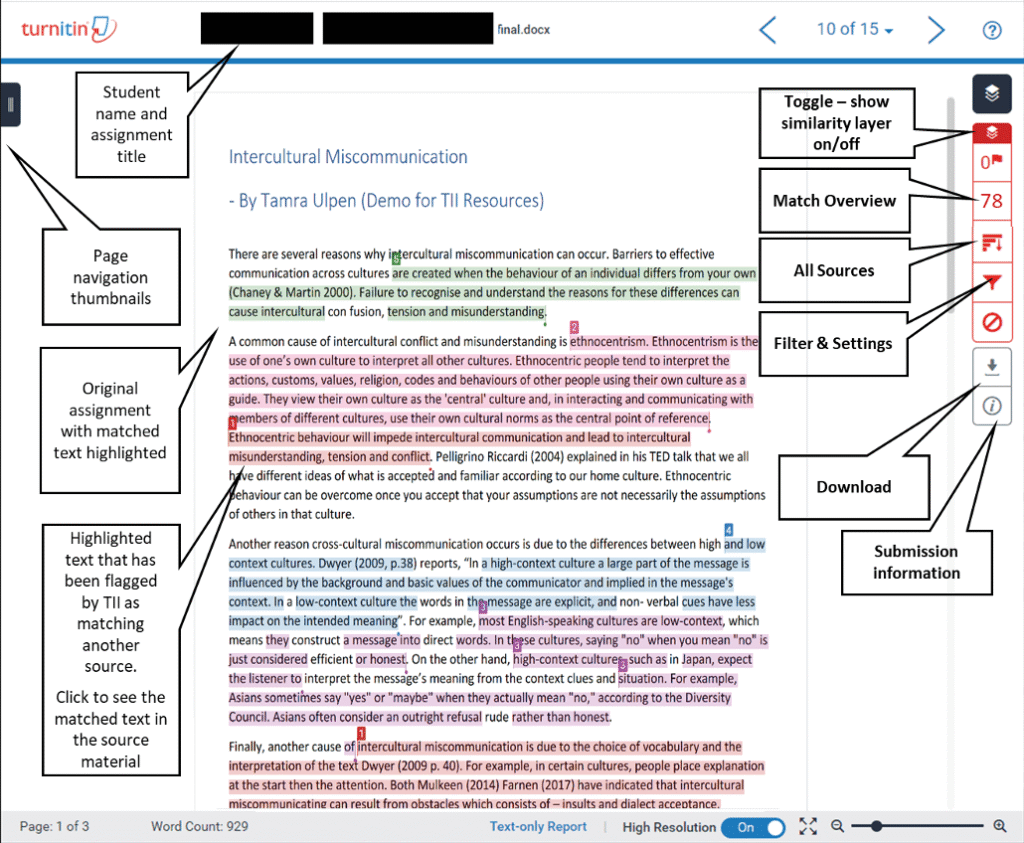
Inside your similarity report, matched text is highlighted in different colors corresponding to different source numbers. Each color in the document links to a specific source listed in the Match Overview panel on the right side of the report. You can click any highlight to pull up the matching source text side-by-side with yours. This is the most practical part of the Turnitin check because it shows you exactly which passages triggered the flag, not just the overall number.
The Enhanced Similarity Report: Four Match Categories
Turnitin updated its Enhanced Similarity Report in 2024 to categorize matches in a more useful way. Instead of just showing you matched text, the report now organizes highlights into four groups based on how the text is cited and quoted:
- Not Cited or Quoted: Matching text with no citation and no quotation marks. This is the highest-risk category and the one instructors look at first.
- Missing Quotation Marks: The text is cited correctly, but it is so close to the original that it should also be in quotation marks. The source is acknowledged, but the formatting is off.
- Missing Citation: The text is placed in quotation marks, but there is no citation pointing to its source. Quotations need both marks and a reference.
- Cited and Quoted: Text that has both quotation marks and a citation. These matches are expected and generally acceptable, though your instructor may still review them for formatting compliance.
This breakdown is far more useful than a single percentage because it tells you why something was flagged, not just that it was flagged.
Turnitin AI Detection: A Separate Score
Since 2023, Turnitin has added an AI writing detection layer alongside the similarity score. These are two completely separate measures. A paper can have a low similarity score and a high AI detection score, or the reverse. They measure different things.
How the AI Detection Score Works
The AI detection percentage reflects how much of the qualifying text in your submission Turnitin suspects was produced by an AI writing tool. “Qualifying text” means long-form prose: paragraphs and sentences written in essay or report style. Turnitin does not analyze code blocks, bullet lists, tables, or other non-standard formats for AI detection purposes.
There is an important update to know about. As of July 2024, Turnitin no longer displays a specific numeric percentage for AI scores that fall below 20%. Instead, those low-confidence scores appear as an asterisk (*%) in the report. The reason for this change is practical: Turnitin found that showing a specific number, even a low one like 8%, caused instructors to treat low-confidence results as definitive evidence of AI use. The asterisk signals that the detection confidence is too low to interpret meaningfully.
AI Detection Color Highlights: Cyan and Purple
In the detailed AI report view, Turnitin uses two specific highlight colors to distinguish types of suspected AI content:
| Color | What It Indicates |
|---|---|
| Cyan | Text suspected to have been written directly by an AI language model (LLM), such as ChatGPT or similar tools |
| Purple | Text suspected to have been generated by AI and then paraphrased using a secondary tool like QuillBot |
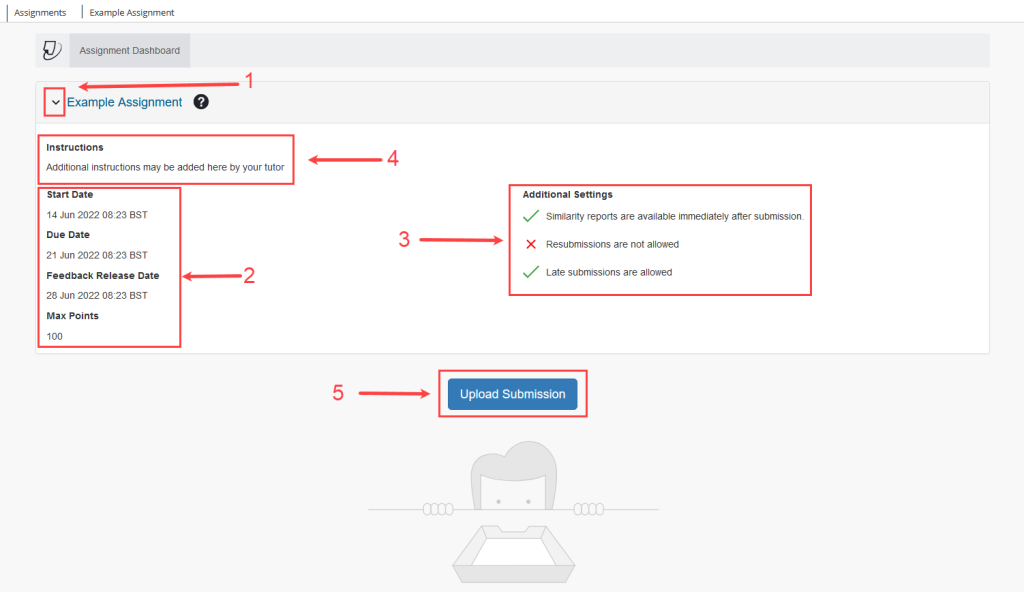
The AI detection panel also includes an interactive color-coded bar that maps suspected AI text across your document. Clicking on any section of that bar jumps you to the corresponding paragraph in your paper. This makes it easy to locate specific flagged sections without scrolling through the whole document.
Is the AI Detection Score Definitive?
No, and Turnitin says so explicitly. The AI writing detection tool produces a probability estimate, not proof. False positives happen, particularly with writing that is highly structured, technical, or formal in style. Some academic disciplines, especially in the sciences, naturally use language patterns that AI detection models can misread. If you receive a high AI detection score and your work is genuinely your own, you should be prepared to discuss your writing process and provide earlier drafts, outlines, or research notes as evidence.
Reading the Match Overview Panel
When you open your Turnitin similarity report, the Match Overview panel on the right side is your main tool. It lists every source that matched text in your submission, starting with the highest-percentage match and going down. For each source, you can see the percentage of your paper that matched it and click through to compare the matching text directly.
Filters: How to Get a Clearer Picture
Your instructor, and sometimes you as a student, can apply filters to the report to strip out matches that are expected or irrelevant. The most commonly used filters are:
- Exclude quotes: Removes any text inside quotation marks from the similarity calculation. Useful for papers with heavy use of direct quotations.
- Exclude bibliography: Strips your reference list from the comparison so that cited sources listed in your bibliography do not inflate the score.
- Exclude small matches: Ignores matches below a set word count, such as 10 words. This removes common phrases, student names, course codes, and other incidental matches that add no meaningful signal.
If your score looks surprisingly high, ask whether these filters are active. A raw score and a filtered score can differ significantly. A paper with 30 direct quotations and a full bibliography might show 35% without filters and drop to 9% once quotes and references are excluded.
Common Scenarios That Confuse People
Submitting Multiple Drafts
If you submit multiple drafts of the same paper to your institution’s private Turnitin repository, your final draft may come back with a very high similarity score because Turnitin is matching it against your own earlier versions. Most institutions handle this by having students submit drafts to a separate practice assignment, not the final submission folder. If your paper shows a 90% match against “your own previous submission,” this is why.
Similarity score percentage ranges
The Collusion Scenario
Turnitin runs a final check across all submissions for an assignment after the due date. This is how it catches collusion between students. In a common scenario, a student who submits a copied paper early might receive a low score, while the original author who submits later gets flagged with a high match because the system now sees two nearly identical papers. After the due date check runs, both are identified as a matching pair. The instructor and institution then investigate to determine who wrote the original.
Your Name and Course Information
Every paper in a class contains the same student names, course codes, and professor names in the header or first page. Turnitin can flag these as matches unless the instructor enables the “exclude small matches” filter set to at least 10 words. If you see your own name highlighted in a match, this is almost certainly why, and it is easily resolved.
What Instructors Actually Do With Your Report
Most instructors do not look at the color or the overall percentage first. They look at what is flagged, not just how much is flagged. A 30% score where every match is a properly cited quotation from peer-reviewed sources is a very different picture from a 12% score where the single flagged block is an uncited paragraph copied from Wikipedia.
The report is designed as an investigative starting point. The instructor reviews the flagged sections, checks whether citations and quotation marks are present, and then decides whether any academic integrity concerns exist. Turnitin does not make that judgment. The instructor does.
Quick Tips to Keep Your Turnitin Score Manageable
- Paraphrase sources in your own words rather than quoting everything directly. Your analysis matters more than the volume of quoted text.
- Put quotation marks around every direct quote, no matter how short, and pair each one with a citation.
- Include a properly formatted bibliography or reference list, and ask your instructor if they exclude it from the report by default.
- Avoid submitting the same paper to multiple classes without prior approval. Self-plagiarism is a real academic integrity issue at many institutions.
- If your institution gives you access to a practice Turnitin submission or a similar plagiarism checker, use it before your final submission to catch issues early.
Turnitin Check vs. Other Plagiarism Checkers
Turnitin is the most widely used plagiarism detection tool in higher education, but it is not the only one. Tools like iThenticate (also owned by Turnitin), Copyscape, and Grammarly’s plagiarism checker operate on similar principles but use different databases. Turnitin’s strength is its student paper repository. Because millions of student submissions are stored there, it can detect recycled essays and collusion between students in a way that a web-only scan cannot. If you are using a free online plagiarism checker to preview your similarity before a Turnitin submission, remember that those tools typically do not have access to Turnitin’s student paper database, so your results will differ.
Summary: What to Focus On
The color and the percentage are the starting point, not the conclusion. A blue score does not guarantee your paper is fine, and a yellow score does not mean you are in trouble. What matters is the breakdown behind the number: which sections are flagged, whether they are cited, whether they are quoted correctly, and whether the AI detection signal is meaningful or a false positive.
Read your report the way your instructor reads it. Go section by section, look at the highlighted matches, check your citations, and fix what actually needs fixing. That is what the Turnitin report is built for.
Looking for more help with academic writing, citation formatting, or understanding your similarity report? Visit answersfountain.com for guides written to help students at every level.