

Can you get 0% AI on Turnitin? Learn how AI detection works, reduce AI flags, and download your Turnitin report with percentage safely.
If you are asking “Is it possible to get 0% AI on Turnitin?”, you are not alone. Many students now check both similarity and AI scores before submitting assignments. The short answer is this:
Yes, a 0% AI score is possible, but it is not something you can guarantee every time.
Turnitin’s AI detection is based on probability, not proof. Even fully human-written work can sometimes get flagged, while edited AI content may pass undetected.
So instead of chasing a perfect 0%, it helps to understand how the system works, what the percentages actually mean, and how to reduce risk before submission.
This page breaks it all down in a simple, practical way, while also showing how AnswersFountain helps you check your work with a real Turnitin report.
How Turnitin AI Detection Actually Works
Turnitin does not “know” if you used ChatGPT or any other tool. It analyzes patterns in your writing. These include:
- Sentence predictability
- Word choice consistency
- Structure and flow
- Repetition and phrasing
If your text matches patterns commonly seen in AI-generated writing, it assigns a percentage score.
Turnitin itself states that its AI detection may not always be accurate and should not be used alone to judge misconduct. (Turnitin Guides)
That matters because many students treat the score as final, when it is only an indicator.
What Does 0% AI Mean?
A 0% AI score means Turnitin did not detect any AI-like patterns in your submission.
However, there is an important detail:
- Scores between 0% and 19% are less reliable and may include false positives or false negatives (Turnitin Guides)
So even if you see 0%, it does not mean your writing is “proven human.” It simply means no AI signals were detected.
Can You Always Get 0% AI on Turnitin?
No, and this is where many students get confused.
Even if you write everything yourself, you might still see a small percentage. Here is why:
- Academic writing often follows structured patterns
- Non-native English writing can trigger flags
- Highly polished text can resemble AI output
- Rewritten or edited drafts can look “too clean”
Some studies show detection accuracy drops significantly when content is edited or paraphrased.
So instead of chasing perfection, aim for low and reasonable AI scores with strong originality.
Can ChatGPT Be Detected by Turnitin?
Yes, but not always.
Turnitin claims high accuracy when content is fully AI-generated. In controlled tests, detection can reach around 98% accuracy for pure AI text.
However, in real-world use:
- Light edits reduce detection significantly
- Heavy rewriting reduces detection even further
- Humanized content may pass with low scores
This explains why two similar assignments can produce very different results.
Can Turnitin Detect AI If You Paraphrase?
Sometimes.
Paraphrasing alone is not a reliable solution. Turnitin looks beyond words and focuses on writing patterns.
That means:
- Simple rewording tools often fail
- AI humanizers may lower scores, but not consistently
- Over-editing can create unnatural patterns
The safest approach is to add your own ideas, structure, and voice, not just rewrite existing text.
How to Get a Low or 0% AI Score on Turnitin
There is no guaranteed formula, but these strategies work in practice.
Write in Your Own Style
Avoid copying AI tone. Natural writing tends to pass more easily.
Add Personal Input
Include examples, explanations, or opinions. AI writing is often generic.
Vary Your Sentences
Mix short and long sentences. Avoid repetitive patterns.
Edit Manually
Automated rewriting tools often leave detectable traces.
Run a Turnitin Check Before Submission
This is the most reliable way to see what your instructor will see.
Turnitin Check: Why You Should Always Preview Your Report
Most students do not have direct access to Turnitin. That means you submit your work without knowing your score.
That is risky.
Using a Turnitin checker for students through a service like AnswersFountain.com allows you to:
- View your similarity percentage
- Check AI detection results
- Identify flagged sections
- Fix issues before submission
This step alone can save you from unnecessary penalties.
How to Download Turnitin Report with Percentage
Once your report is ready, you can download it easily.
Follow these steps:
- Open the Turnitin document viewer
- Review similarity and AI indicators
- Click download
- Export the file as PDF
This is how you download Turnitin report in PDF format, the same version your instructor sees.
Turnitin Checker for Students: What You Should Know
If you are looking for a Turnitin checker for students, here is the reality.
Turnitin does not offer free public access. Most students use it through their institution.
If you do not have access, you can:
- Use your school’s system
- Ask your instructor
- Use a third-party service that provides reports
Turnitin Login Student and Sign Up
There is no universal Turnitin sign up for independent users.
Students usually access it through:
- University portals
- Learning systems like Moodle or Canvas
So if you are searching for Turnitin login student access, you will likely need institutional credentials.
How to Use Turnitin Effectively
If you have access, use it strategically.
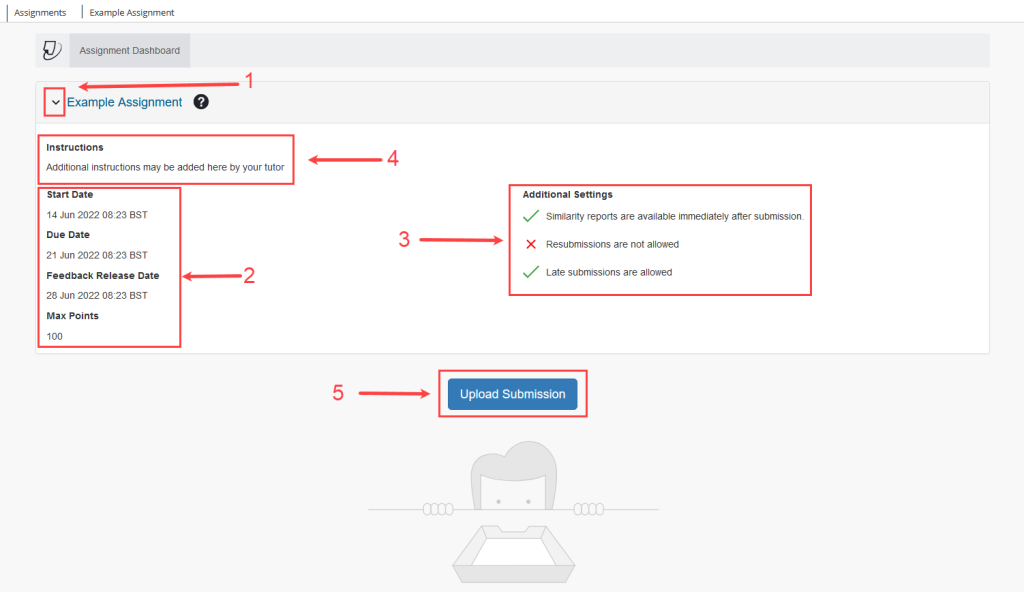
- Upload your document
- Wait for the report
- Review similarity score
- Check AI detection
- Edit flagged sections
- Resubmit if allowed
This process helps you refine your work before final submission.
Understanding Turnitin Feedback Studio
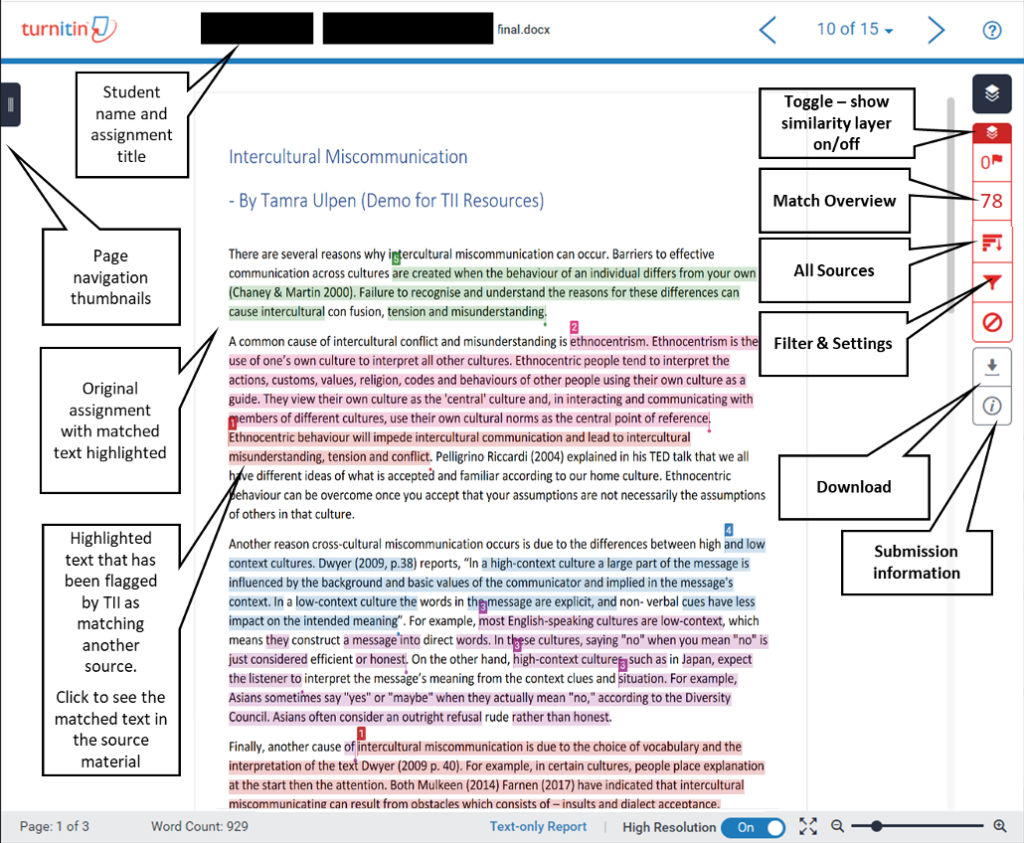
Turnitin Feedback Studio is where you view your report.
Inside, you can:
- See matched sources
- Review similarity highlights
- Check instructor comments
- Analyze AI detection sections
It gives you a clear picture of what needs improvement.
Is 25% on Turnitin Too High?
It depends on the content.
Here is a general guide:
- 0% to 10% is low
- 10% to 25% is moderate
- Above 25% may raise concerns
But not all similarity is bad. References, quotes, and common phrases can increase your score.
Is a 20% Turnitin Score Okay?
Yes, in many situations.
A 20% score can be acceptable if:
- Sources are properly cited
- Matches come from references
- The main content is original
Context matters more than the number alone.
What Color Is AI Detection on Turnitin?
Turnitin uses color indicators to show flagged content.
Different shades highlight sections that may contain AI patterns.
These colors guide review, but they are not final judgments.
What Does a Yellow Turnitin Flag Mean?
A yellow flag usually signals moderate similarity or areas that need attention.
It can indicate:
- Overlapping content
- Common phrasing
- Sections worth reviewing
It does not automatically mean misconduct.
How Do Students Avoid Turnitin Flags?
Students who avoid problems tend to follow simple habits.
- Write original drafts
- Cite sources properly
- Avoid relying fully on AI tools
- Review reports before submission
These steps reduce both similarity and AI detection risks.
Can You Get Caught Using ChatGPT for Assignments?
Yes, especially if the content is submitted without changes.
You are more likely to be flagged if:
- The text is entirely AI-generated
- The writing is too uniform
- There is no personal input
You reduce risk when you:
- Use AI for ideas only
- Rewrite content fully
- Run a Turnitin check before submission
Which AI Humanizer Passes Turnitin?
There is no tool that works every time.
Some AI humanizers lower detection, but results vary.
Turnitin updates frequently, so patterns that worked before may fail later.
The safest method is still manual editing combined with your own input.
How to Get Turnitin for Free as a Student
Free access is limited.
You can try:
- University accounts
- Instructor submissions
- Trial-based services
If you need quick access, services that provide non-repository reports are often the easiest option.
Why AnswersFountain Is the Smart Way to Check Your Work
Instead of guessing your results, you can preview them.
With AnswersFountain, you can:
- Get a real Turnitin report
- Check AI detection and similarity
- Download your report in PDF
- Review flagged sections
- Make corrections before submission
This gives you full visibility before your instructor sees your work.
Final Thoughts
Getting 0% AI on Turnitin is possible, but it should not be your main focus.
A better approach is simple:
- Write clearly
- Add your own thinking
- Use AI carefully
- Check your work before submitting
Turnitin is not perfect. It can flag human writing and miss edited AI text.
So focus on producing strong, original work and verifying it with a proper Turnitin check.
Ready to Check Your Paper?
If you want to avoid surprises, take control of your submission.
Upload your document to AnswersFountain and:
- Get the exact Turnitin report your instructor will see
- Download your Turnitin report with percentage
- Identify AI and similarity risks early
Submit your work with clarity and confidence.