

Confused by your Turnitin report? Learn the clear difference between Turnitin AI detection and similarity scores, how to read each metric, and what professors actually see.
Turnitin AI vs Similarity Score: What Is the Difference?
You uploaded your paper, waited for the report, and now you are staring at two numbers that feel like they control your academic fate. One is your similarity percentage. The other is your AI detection score. Most students treat them like the same thing. They are not. Turnitin runs two completely independent checks on every submission, and misunderstanding how they work can cost you a grade you actually earned. If you want to pass your Turnitin check without stress, you need to know what each score measures, why they can contradict each other, and how professors interpret the results.
What Turnitin Actually Checks
Turnitin is not a single tool. It is a platform with two separate engines running side by side. The first engine has existed for over two decades. The second launched in April 2023 and has received major updates through 2025 and 2026. When you submit a paper, both engines analyze it independently. Your similarity score comes from one system. Your AI score comes from the other. They do not talk to each other.
The Similarity Report
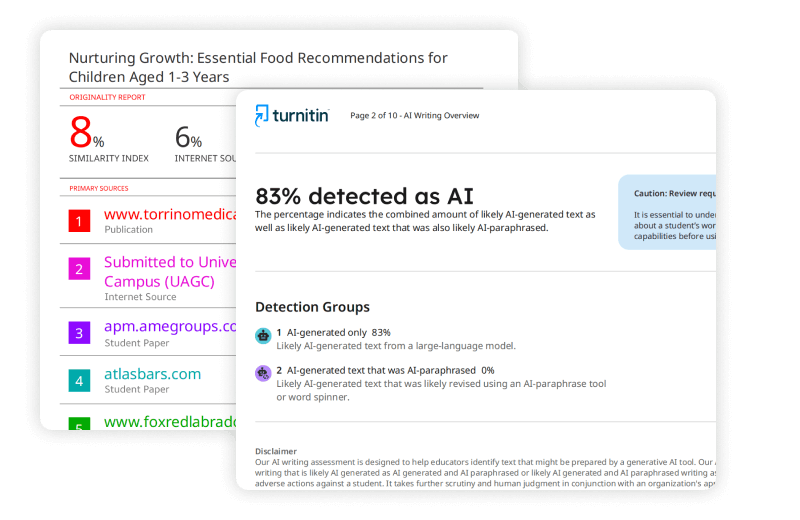
The similarity report compares your text against Turnitin’s massive database. That database includes billions of current and archived web pages, thousands of academic journals and periodicals, and a repository of papers previously submitted by students at other institutions . The system looks for exact or near-exact text matches. It then calculates a similarity score, which is simply the percentage of your submission that matches something already in the database .
Here is what students constantly get wrong. A 20% similarity score does not mean you plagiarized 20% of your paper. It means 20% of your text matches sources in the database. That match could be a properly cited quote, a standard definition in your field, or a reference list that uses the same formatting as thousands of other papers. Turnitin itself stresses that it does not check for plagiarism. It checks for similarity, and it leaves the judgment to your instructor .
The similarity score uses a color-coded range. Blue means no matching text. Green covers one word to 24% matching text. Yellow runs from 25% to 49%. Orange hits 50% to 74%. Red means 75% to 100% . Many universities consider green scores routine. Yellow and orange scores prompt a closer look. Red scores almost always trigger a conversation with your professor, though even a red score can be harmless if the matches are all from correctly cited sources.
The AI Writing Report
The AI writing report works entirely differently. Instead of comparing your text to an external database, it analyzes the linguistic patterns inside your writing. Turnitin’s model breaks your paper into segments of roughly five to ten sentences, with overlap so context stays intact . It then evaluates each sentence on a scale from 0 to 1, where 0 suggests human authorship and 1 suggests AI generation. The scores are averaged to produce an overall AI percentage for the document .
The system looks for specific signals. It measures how predictable your word choices are. It tracks variation in sentence length. It checks for stylometric patterns that tend to differ between human and machine-generated prose . Since mid-2025, Turnitin has also added detection for AI bypassers, which are tools that rephrase AI-generated text to evade detectors .

Check before you submit. Get Turnitin Score Report in 15 Minutes.
Don't risk the 'Red' score. Get the exact same Turnitin report your supervisor uses. You will receive a full PDF similarity report including AI detection.
According to the University of Melbourne, the percentage score represents the amount of text that Turnitin calculates as 98% or more likely to have been generated or paraphrased by AI . That is a high confidence threshold, but it is still probabilistic. Turnitin openly states that its AI writing detection model may misidentify human-written, AI-generated, and AI-paraphrased text, so it should not be used as the sole basis for adverse actions against a student .
Why the Two Scores Are Completely Independent
This is the part that confuses almost everyone. Your similarity score and your AI score have nothing to do with each other. You can score 0% on similarity and still get flagged for AI writing. You can score 60% on similarity and have a 0% AI score. They measure different risks .
Think about it this way. If you ask ChatGPT to write an original essay on a niche topic and then submit it, the text will be entirely new. It will not match anything in Turnitin’s database. Your similarity score could be 0%. But the writing patterns will still carry the statistical fingerprints of the language model. Your AI score could be 80% or higher. The paper is original, but it is not human-written.
On the flip side, you could write every word yourself but rely heavily on direct quotes from published sources. Your AI score could be 0% because the writing is genuinely yours. Your similarity score could be 40% because of all the quoted material. The paper is human-written but matches existing sources extensively.
Turnitin’s February 2026 data release showed that approximately 15% of essay submissions now contain more than 80% AI-generated writing, up from roughly 3% when the AI detector first launched in 2023 . That five-fold increase is exactly why universities now scrutinize both scores. Professors know that a low similarity score does not prove originality of authorship. They also know that a high similarity score does not prove cheating. The two metrics together give a fuller picture.
How to Read Your AI Score on a Turnitin Score Check
When you run a Turnitin score check, the AI result appears as a percentage, but the display depends on the range. Scores from 20% to 100% show as a blue badge with the exact number . Scores from 1% to 19% show only as an asterisk, like *%, because Turnitin considers low percentages unreliable and wants to minimize false accusations . A gray dash means the file could not be processed, often because it is a scanned PDF or an unsupported format. A red error icon means a technical failure occurred .
Here is how educators typically interpret the ranges:
- 0%: No AI-like patterns detected. This usually aligns with human-authored, idiosyncratic writing, though it does not guarantee no AI was used if the text was heavily revised .
- 1–10%: Minimal AI-likely segments. Often generic transitions or templated phrases. Usually not a concern on its own .
- 11–19%: Noticeable but below Turnitin’s display threshold. Since July 2024, these scores are suppressed to an asterisk to reduce misinterpretation .
- 20–40%: Significant AI-like content. This is Turnitin’s practical floor for concern. Instructors will likely ask for drafts and notes .
- 41–60%: Majority of text follows AI patterns. A formal review becomes likely .
- 61–80%: Predominantly AI-like throughout. This sends a strong signal for an integrity investigation .
- 81–100%: Strongly resembles unedited LLM output. This triggers the institutional integrity process .
The University of Melbourne clarifies that even a 40% AI-detected score does not automatically mean a student is guilty of misconduct. It simply triggers a review where the student can provide evidence of their writing process .
How to Read Your Similarity Score on a Turnitin Check
The similarity score is simpler to interpret but still requires context. A blue icon means 0% matching text. Green means up to 24%. Yellow means 25% to 49%. Orange means 50% to 74%. Red means 75% to 100% .
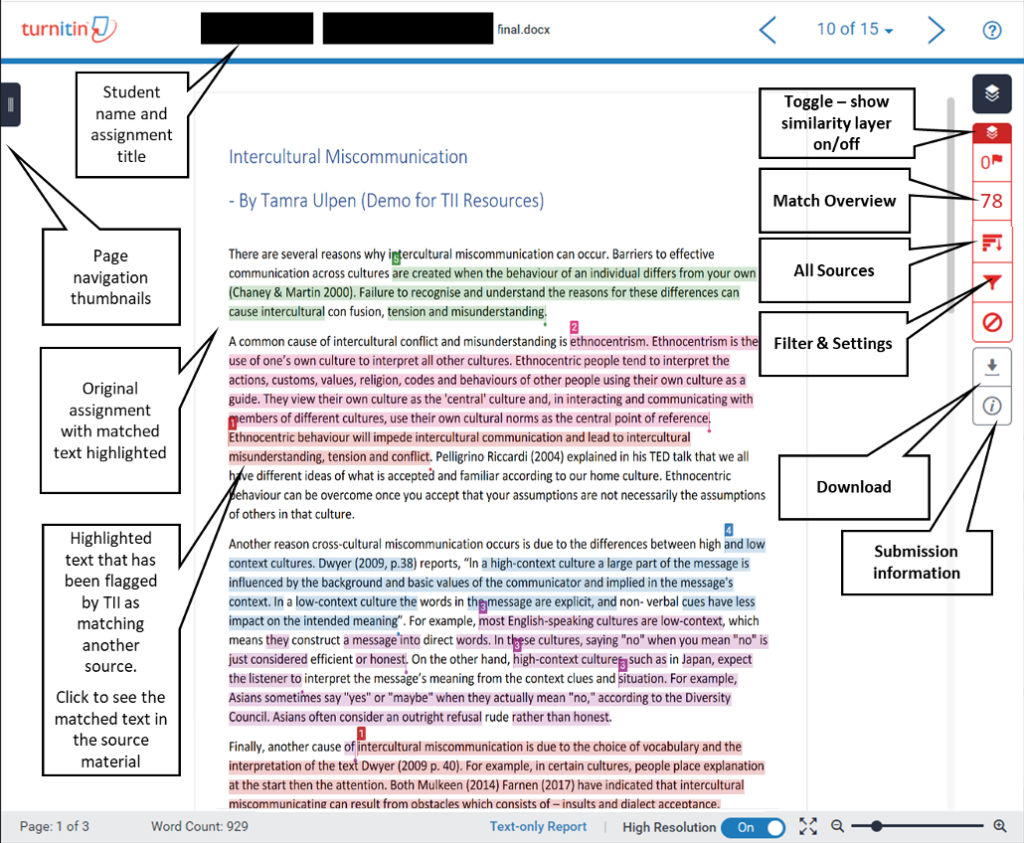
What matters is not the color but the source of the matches. If your paper matches a single source heavily, that looks suspicious. If it matches dozens of sources lightly, that is often normal for a well-researched paper with proper citations. Turnitin highlights every match so your professor can see exactly where the text overlaps with existing sources .
Common scenarios that inflate similarity scores innocently include:
- Using the same assignment prompt or cover sheet as other students
- Quoting extensively from sources with proper citations
- Using standard definitions or technical terminology that appears in many papers
- Submitting a paper that includes your own previous work, which is already in the student repository
Turnitin also checks for student collusion by matching submissions against its repository of previously submitted student work . This catches contract cheating and recycled assignments, though it can also flag your own earlier drafts if you submitted them for feedback.
What Professors See and What You See
Here is a detail that catches many students off guard. The AI writing report is usually invisible to you. Turnitin does not make the AI detection indicator or report visible to students, even if your instructor has set the similarity report to display . Only instructors can see the AI score by default. If there are concerns, your instructor can share a PDF copy of the report with you .
This means you cannot rely on the standard plagiarism checker view to warn you about potential AI flags. If you want to know your AI score before submitting to your university’s official portal, you need to run a private Turnitin score check through a service that gives you the full instructor view. That is exactly what answersfountain.com provides. You get the same report your professor sees, including both the similarity percentage and the AI detection percentage, so you can fix problems before they become academic integrity cases.
Why False Positives Happen in Both Systems
No detection system is perfect. Similarity scores can flag legitimate citations. AI scores can flag human writing that happens to match machine patterns.
Turnitin notes that low AI percentages, such as 11%, are likely to be false positives . The system is intentionally tuned to give human writers the benefit of the doubt, which means it sometimes overestimates human authorship and occasionally flags genuine human work that is too polished or formulaic . Non-native English speakers face higher false positive rates because their writing patterns sometimes resemble LLM output . Highly structured formats like lab reports or policy boilerplate can also complicate detection because they use standardized language that looks algorithmic .
On the similarity side, false positives usually come from common phrases, reference lists, or template text that thousands of students use. The system is not smart enough to know that “The United Nations was founded in 1945” is a factual statement, not plagiarism. It just sees the match.
How to Keep Both Scores Under Control
If you want to pass your Turnitin check with confidence, you need to manage both scores proactively. Here is a practical approach.
For Similarity
- Paraphrase sources instead of quoting long passages verbatim
- Use citations correctly so your professor can see the match is intentional
- Avoid recycling your own previous assignments without checking your institution’s self-plagiarism policy
- Run a private Turnitin score check before your official submission to see exactly which sources get flagged
For AI Detection
- Write your own drafts first, then use AI only for brainstorming or grammar checks if your policy allows it
- Vary your sentence length and structure intentionally. AI tends toward uniform rhythm
- Use specific examples, personal anecdotes, and field-specific jargon that a general language model would not generate
- Avoid submitting text that has been run through free online humanizers. Turnitin has detected these bypasser tools since August 2025, and many of them actually increase your AI score instead of lowering it
- Keep drafts, outlines, and revision histories with timestamps. If you get flagged, this documentation proves your writing process
Downloading and sharing the Similarity Report
The Bottom Line on Turnitin AI vs Similarity
The similarity score measures how much of your text matches existing sources. The AI score measures how much of your text resembles machine-generated writing. One checks for overlap with the past. The other checks for patterns of automation. They are independent, they can contradict each other, and professors use both to build a complete picture of your work.
According to Turnitin’s own guidance, neither score is a verdict. The similarity report is a tool for review. The AI indicator is one data point among many . Your professor makes the final call based on context, your writing history, and any evidence you can provide about your process.
If you need to know exactly what your professor will see before you hit submit, run a full Turnitin score check that includes both metrics. At answersfountain.com, we provide official Turnitin reports with the complete similarity and AI breakdown, delivered privately so you can fix issues before they reach your instructor. Do not guess what your scores mean. Check them, understand them, and submit with confidence.