

Is a 20% Turnitin score okay? Learn what your similarity report means, how to handle AI detection, and tips for students to use Turnitin effectively.
Understanding Similarity Reports: Is a 20% Turnitin score okay?
If you just submitted your paper and saw a 20% match, you might feel a bit of panic. Most students wonder, is a 20% Turnitin score okay? The short answer is usually yes. In most academic circles, a similarity score under 25% is acceptable. However, this is not a hard rule. Some professors look at that number and see a job well done. Others might look closer to see why that 20% exists in the first place.
Turnitin does not actually measure plagiarism. It measures similarity. It compares your text against a massive database of journals, websites, and other student papers. If you used a lot of direct quotes or a long bibliography, your score will naturally climb. This is where you need to look at the details rather than just the big number. If that 20% comes from properly cited sources and common phrases, you have nothing to worry about. If it comes from a single block of copied text, even a 10% score could get you in trouble.
Breaking Down the Turnitin Similarity Colors
When you look at your report, you will notice different colors. These colors represent the percentage of matching text found in your document. Understanding these can help you figure out if your work needs more editing.
| Color | Percentage Range | What it generally means |
| Blue | 0% | No matching text found. |
| Green | 1% to 24% | Standard range for most assignments. |
| Yellow | 25% to 49% | Moderate similarity; requires review. |
| Orange | 50% to 74% | High similarity; likely problematic. |
| Red | 75% to 100% | Very high similarity; almost certainly plagiarized. |
So, what does a yellow Turnitin flag mean? If your report shows yellow, you have hit that 25% to 49% bracket. This is a signal to your instructor to look deeper. It does not mean you cheated. It might just mean your topic requires a lot of technical terms or legal citations that appear elsewhere. Still, you should aim to keep it in the green zone to stay safe.
Is 25% on Turnitin too high?
You might find yourself asking, is 25% on Turnitin too high? The answer depends on your department. A law student or a medical student might have a higher score because they have to use specific, unchangeable terminology. A creative writing student, however, should have a much lower score.
Most universities set a threshold. If you go over 25%, the system flags your paper for a manual check. Your professor will then open the Turnitin document viewer to see exactly what matched. If the matches are just “The University of New York” or “According to the latest research,” they will likely ignore it. If the matches are full sentences from a Wikipedia page, you have a problem.
Setting Up Your Account: Turnitin Sign Up and Login
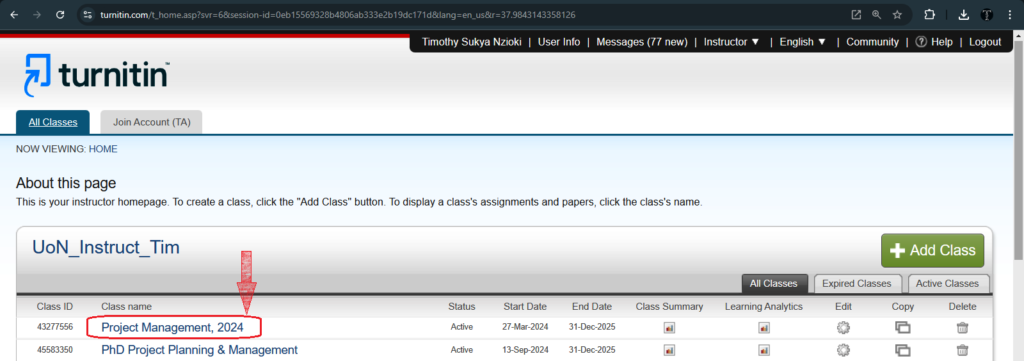
Before you can even worry about scores, you need to get into the system. Usually, your school handles this for you. They will create an account and send you a join link. For a manual Turnitin sign up, you usually need a class ID and an enrollment key provided by your instructor.
Once you have those details, the Turnitin login student portal is where you will spend most of your time. You can see your active classes, check upcoming deadlines, and view feedback on previous submissions. If you are trying to figure out how to get Turnitin for free as a student, the best way is through your institution. Almost every major college provides access to students as part of their tuition. Avoid third-party sites that claim to give free access; they often steal your data or sell your papers to other databases.
How to use Turnitin for the First Time
If you are new to the platform, you might feel a bit lost. How to use Turnitin is actually quite simple once you get the hang of it. After logging in, click on your class name. You will see a list of assignments. Click the “Submit” button next to the one you are working on.
You can upload files directly from your computer, Google Drive, or Dropbox. After you submit, the system takes a few minutes to process your work. Once it finishes, you can click on the percentage icon to open the Turnitin Feedback Studio. This is the main interface where you can see your similarity report, instructor comments, and grading rubrics.
Navigating the Turnitin Document Viewer
The Turnitin document viewer is the window that shows your paper with all the highlights. Each highlighted section corresponds to a source on the right side of the screen. You can click on these highlights to see the original source text.
This tool is incredibly helpful for self-editing. If you see a huge block of red or purple text, you know you need to go back and paraphrase those sections. It also helps you see if you forgot to put quotation marks around a direct quote. Using this viewer effectively can help you lower your score before your professor even sees it.
Can ChatGPT be detected by Turnitin?
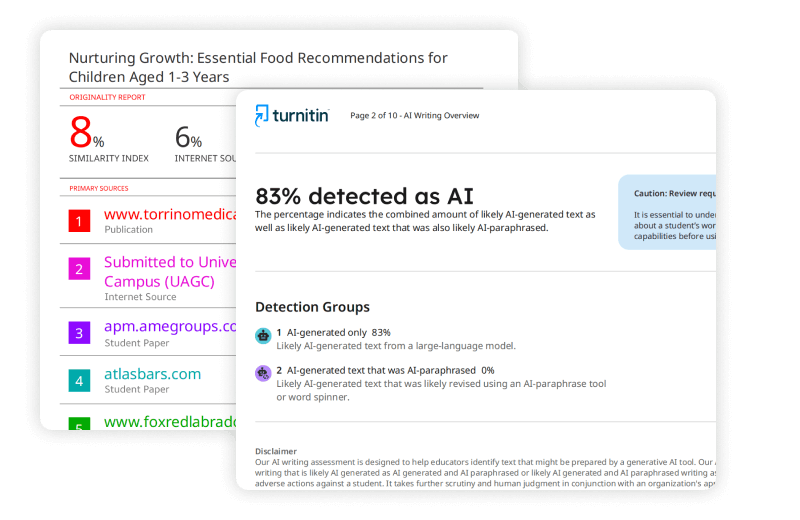
This is the big question for 2026. Can ChatGPT be detected by Turnitin? Yes, it can. Turnitin released an AI writing detection tool that specifically looks for the patterns of Large Language Models. AI tends to write in a very predictable, “average” way. It lacks the weird quirks, varied sentence structures, and specific personal insights that humans have.
When you submit a paper, Turnitin runs a separate check for AI content. This is different from the similarity score. You could have a 5% similarity score but a 90% AI score. Both can lead to academic integrity issues.
AI Detection: What color is AI detection on Turnitin?
You might be looking at your report and wondering, what color is AI detection on Turnitin? Unlike the similarity report, which uses a rainbow of colors, the AI detection indicator is usually a separate blue or purple icon in the Feedback Studio. It shows a percentage. If you click it, the document viewer will highlight the specific sentences it believes an AI wrote.
This tool is quite sensitive. Sometimes it flags human writing as AI, which is why most professors use it as a starting point for a conversation rather than immediate proof of cheating. However, if your entire paper is highlighted in the AI report, it is hard to argue otherwise.
Can Turnitin detect AI if I paraphrase?
Many students try to beat the system by using an AI to write a draft and then changing a few words. Can Turnitin detect AI if I paraphrase? The answer is often yes. The AI detector does not just look for specific words; it looks for the underlying structure of the sentences. Even if you swap “big” for “large,” the logical flow remains robotic.
If you are wondering how do students avoid Turnitin flags regarding AI, the only real answer is to write the work yourself. You can use AI for brainstorming or outlining, but when it comes to the actual sentences, your own voice is your best protection.
Is it possible to get 0% AI on Turnitin?
Yes, is it possible to get 0% AI on Turnitin? Absolutely. If you write your paper from scratch using your own thoughts and research, the AI detector will likely show 0%. Even if you use a grammar checker like Grammarly for basic spelling, it usually stays at 0% or very low.
The system is designed to recognize human thought. It looks for those “messy” human transitions and varied sentence lengths that AI struggles to replicate. If you write naturally, you don’t have to worry about this score at all.
How to get a 0% on Turnitin similarity?
While a 0% AI score is great, you might also wonder how to get a 0% on Turnitin for similarity. Honestly, getting a 0% similarity score is actually quite rare and sometimes looks suspicious. It might suggest that you didn’t use any outside sources at all, which is usually not what a professor wants in a research paper.
To get a very low score, you should:
- Paraphrase everything in your own words.
- Use very few direct quotes.
- Avoid using common templates for your cover page.
- Make sure your bibliography is excluded from the final check.
Most instructors are perfectly happy with a score between 5% and 15%. It shows you did your research but wrote the content yourself.
How to download Turnitin report in PDF
Once your report is ready, you might want a copy for your records or to show your tutor. Knowing how to download Turnitin report in PDF is a great skill.
- Open the Turnitin Feedback Studio for your assignment.
- On the right-hand side toolbar, look for the “Download” icon (it looks like a downward-pointing arrow).
- Select “Current View.”
- The system will generate a PDF that includes your paper, the highlighted matches, and the percentage breakdown.
This PDF is vital if you need to prove that your work was original at the time of submission. It includes a digital receipt and a date stamp.
How to download Turnitin report with percentage
If you specifically need the breakdown of sources, you should follow the same steps for the PDF download. The “Current View” option is exactly how to download Turnitin report with percentage. The final pages of that PDF will list every source found and the specific percentage of your paper that matches that source. This is the document you should look at if you are trying to understand why your score is higher than expected.
Can you get caught using ChatGPT for assignments?
Let’s be direct here. Can you get caught using ChatGPT for assignments? Yes. Schools are much more aware of AI than they were a couple of years ago. Beyond the Turnitin AI detector, professors often notice when a student’s writing style suddenly changes. If your previous papers were average and suddenly you are writing like a professional academic with perfect syntax, it raises questions.
If you are caught, the consequences vary from a zero on the assignment to expulsion from the university. It is rarely worth the risk. Use AI as a tool for learning, not as a replacement for your own brain.
Which AI Humanizer passes Turnitin?
You might see ads for tools that claim to “humanize” AI text to bypass detection. If you are looking for which AI Humanizer passes Turnitin, the truth is that none of them are 100% reliable. Turnitin updates its detection algorithms constantly. What worked last month might get flagged today.
More importantly, using a “humanizer” is often considered a double violation. You are using AI to write and then using another AI to hide the first one. This shows intent to deceive, which often leads to harsher penalties if you are caught.
Using a Turnitin checker for students
If your school does not give you a way to check your work before the final submission, you might look for a Turnitin checker for students online. Be careful here. Many “free” checkers actually add your paper to a database. When you finally submit it to your school, Turnitin will flag your own paper as a 100% match because it was already “published” on that free site.
Always use the official portal provided by your university. Many instructors set up a “draft” folder that allows you to check your score without it being stored in the permanent repository. If you are unsure, just ask your professor if they have a draft submission link available.
Why your score might be high (and how to fix it)
Sometimes you get a high score even when you didn’t cheat. Here are a few reasons why:
- The Bibliography: If Turnitin checks your references, your score will skyrocket. Most professors know to ignore this.
- Direct Quotes: If you use many long quotes, even with citations, the similarity score goes up. Try paraphrasing more of these points.
- Common Phrases: In technical fields, some sentences only have one way to be written. Turnitin might flag these as matches.
- Templates: If your department requires a specific cover page, everyone will have a match on that page.
If you see these issues, don’t panic. You can often ask your instructor to “exclude bibliography” or “exclude quotes” in the report settings to see your true similarity score.
Final Thoughts on the 20% Score
So, back to the main point. Is a 20% Turnitin score okay? Yes, it usually is. It shows that you are engaging with other sources but still providing your own original thought. As long as those matches are properly cited and don’t represent a single copied source, you are in the clear.
Focus on your Turnitin login student portal and use the Turnitin document viewer to check your work early. Understanding your report is the best way to avoid stress and ensure your academic success. If you keep your writing honest and your citations accurate, Turnitin becomes a helpful tool rather than something to fear.