

Does Turnitin Detect AI Like ChatGPT? The Truth Explained
Does Turnitin detect ChatGPT? Learn how Turnitin AI detection works, what the scores mean, and how to read your Turnitin report before you submit.
Does Turnitin Detect AI Like ChatGPT? Here Is What Actually Happens
You paste your essay into the submission box. Your heart rate ticks up. Somewhere in the back of your mind, you wonder if that paragraph you drafted with ChatGPT is going to trigger something. You are not alone. Millions of students run a Turnitin check every semester, and since 2023, those checks now include a second layer. Turnitin looks for plagiarism, yes. But it also scans for AI writing patterns. The question is not whether Turnitin can detect AI. It can. The real question is how often it gets it right, what happens when it gets it wrong, and what you can do about it before your professor sees the report.
Let us walk through the mechanics, the numbers, and the practical reality of what a modern Turnitin check actually reveals.
How Turnitin Works Now (It Is Two Different Checks)
Most students think Turnitin is one big plagiarism net. That was true for years. Today, it runs two completely independent analyses on every submission.
First, the similarity check compares your text against billions of web pages, academic journals, and previously submitted student papers. It spits out a similarity score. That score tells your instructor how much of your text matches existing sources. A 20% similarity score does not mean 20% of your paper is plagiarized. It means 20% of your text exists somewhere in Turnitin’s database, including properly cited quotes and standard terminology in your field.
Second, the AI writing detection layer runs a separate scan. This one does not compare your words to outside sources. It analyzes the statistical patterns inside your document. Turnitin asks a different question here. Instead of “Where did this come from?” it asks “Does this text behave like AI-generated text?” These two scores are independent. You can have 0% similarity and an 80% AI score. You can also have 30% similarity and 0% AI. Understanding this separation is the first step to reading your Turnitin report correctly.
The Technology Behind the AI Scan
Turnitin’s AI detection launched in April 2023. As of 2026, over 16,000 institutions use it, and the company has processed more than 130 million papers through the AI detector. The system breaks your document into overlapping segments of roughly five to ten sentences. Each segment receives a probability score from 0 to 1. Zero means likely human-written. One means likely AI-generated. The system averages these segment scores into an overall percentage.
This segmentation matters. If you wrote the introduction yourself but pasted an AI-generated conclusion, the overall score might sit in the middle. Your professor can see which sections triggered the flag, not just a raw number at the top of the page.
Does Turnitin Detect ChatGPT? The Short Answer
Yes. Turnitin detects ChatGPT output, especially when that output is pasted directly into a document with little or no editing. According to Turnitin’s own reporting, the detector catches around 85% of unmodified AI text while keeping the false positive rate below 1% for documents scoring above 20%. In controlled testing against raw ChatGPT output, accuracy has reached as high as 98%.
But that headline number comes with baggage. The 98% figure applies to pristine, unedited AI text. Real student work is rarely that clean. Students edit. They mix their own writing with AI-generated sections. They rewrite paragraphs in their own words. In these real-world scenarios, detection rates drop significantly. A study from Temple University found that Turnitin almost always correctly identified fully human or fully AI-generated texts, but it struggled with hybrid content where human and AI writing were mixed. That gray area is where most students actually live.
Detection Rates by AI Model
Turnitin trains its models on output from the major large language models. Detection rates vary depending on which tool generated the text.
| AI Model | Turnitin Detection Rate |
|---|---|
| ChatGPT-4o | 96% |
| Claude 3.5 | 92% |
| Gemini Pro | 91% |
| Llama 3 | 89% |
| Mistral | 87% |
ChatGPT output gets flagged most consistently because Turnitin’s training data is heavily weighted toward GPT-style text. If you used ChatGPT to generate sections of your paper, the Turnitin check will likely notice.
What Turnitin Actually Looks For
Turnitin does not have a secret copy of every ChatGPT conversation stored in a vault. It cannot see your browser history. It does not know which AI tool you used. What it does is measure linguistic patterns that are statistically common in machine-generated text.
Perplexity and Burstiness
Two concepts drive the algorithm. Perplexity measures how predictable your word choices are. AI models like ChatGPT are designed to select the most statistically likely next word in a sentence. The result is smooth, predictable prose. Human writing is messier. We backtrack, use odd phrasings, and make unexpected word choices. If Turnitin can guess your next word easily, your text has low perplexity. That is a red flag.
Burstiness measures variation in sentence structure and length. Human writing has rhythm. You might write a long, winding sentence full of clauses, then follow it with a short one. AI output tends toward uniformity. Sentences cluster around the same length, usually 15 to 20 words. The rhythm is too steady. Turnitin spots that mechanical regularity.
Other Patterns That Trigger Flags
Beyond the math, certain stylistic habits show up repeatedly in AI text. Turnitin has learned to associate these with machine writing.
- Uniform sentence length across paragraphs
- Repetitive transition words like “Furthermore,” “Moreover,” and “Additionally” appearing in predictable sequences
- Perfect paragraph structure where every section follows an introduction-body-conclusion formula
- Absence of personal voice, specific examples, or first-person anecdotes
- Overly neutral, balanced tone without genuine opinion or edge
If your paper reads like a polished Wikipedia summary, the Turnitin AI detection layer will take a hard look at it.
What Turnitin Gets Wrong
No detection system is perfect. Turnitin’s false positive rate sits around 3.8% overall, but it jumps to roughly 7% for ESL writers. That means real human writing gets flagged as AI-generated, and it happens more often than the company likes to admit.
Why Human Writing Gets Flagged
False positives usually happen for a few specific reasons. If your writing is highly formal and follows rigid academic templates, it can look AI-like. The same goes for text that has been heavily processed through paraphrasing tools. Those tools often strip out natural variation and replace it with smoothed-out synonyms, which creates the exact uniform patterns Turnitin hunts for.
Another trigger is mixed authorship. If you wrote most of your paper but used AI for one section, Turnitin sometimes flags nearby human-written sentences too. Data from Inside Higher Ed, citing Turnitin’s own statements, showed that 54% of false positive sentences appear right next to AI-written sentences. The algorithm seems to bleed its suspicion into surrounding text.
The ESL Student Problem
Non-native English speakers get hit hardest. ESL writing often uses simpler sentence structures and more predictable vocabulary, not because the student used AI, but because they are writing within the limits of their current fluency. Turnitin misreads this caution as machine predictability. The false positive rate for ESL students is nearly double the general rate. If English is not your first language, you should know that a high AI score on your Turnitin report might reflect your writing style, not academic dishonesty.
Reading Your Turnitin Report Correctly
When your instructor opens your submission, they see two numbers. One is the similarity score. The other is the AI writing percentage. Students often confuse them. They are not the same thing.
AI Score vs Similarity Score
The similarity score tells your instructor how much text matches existing sources. The AI score tells them how much of your prose looks like it was generated by a language model. You can have a 0% similarity score and a 75% AI score. That means your text is original, but it reads like ChatGPT wrote it. Conversely, you can have a 25% similarity score and a 0% AI score. That means you matched some sources, but your writing patterns look human.
Here is how to interpret the AI percentage:
| Turnitin AI Score | What It Means | Likely Action |
|---|---|---|
| 0-5% | Very likely human-written | No concern |
| 6-20% | Some AI-like patterns detected | Review flagged sections; asterisk indicates caution |
| 21-50% | Significant AI patterns present | May trigger instructor review |
| 51-80% | Mostly AI-generated patterns | Likely to be investigated |
| 81-100% | Almost certainly AI-generated | Will be flagged for formal review |
Scores between 1% and 19% carry an asterisk in the Turnitin report. Turnitin itself acknowledges that this range has a higher incidence of false positives. Your instructor should treat these low scores with skepticism.
What the Colors Mean
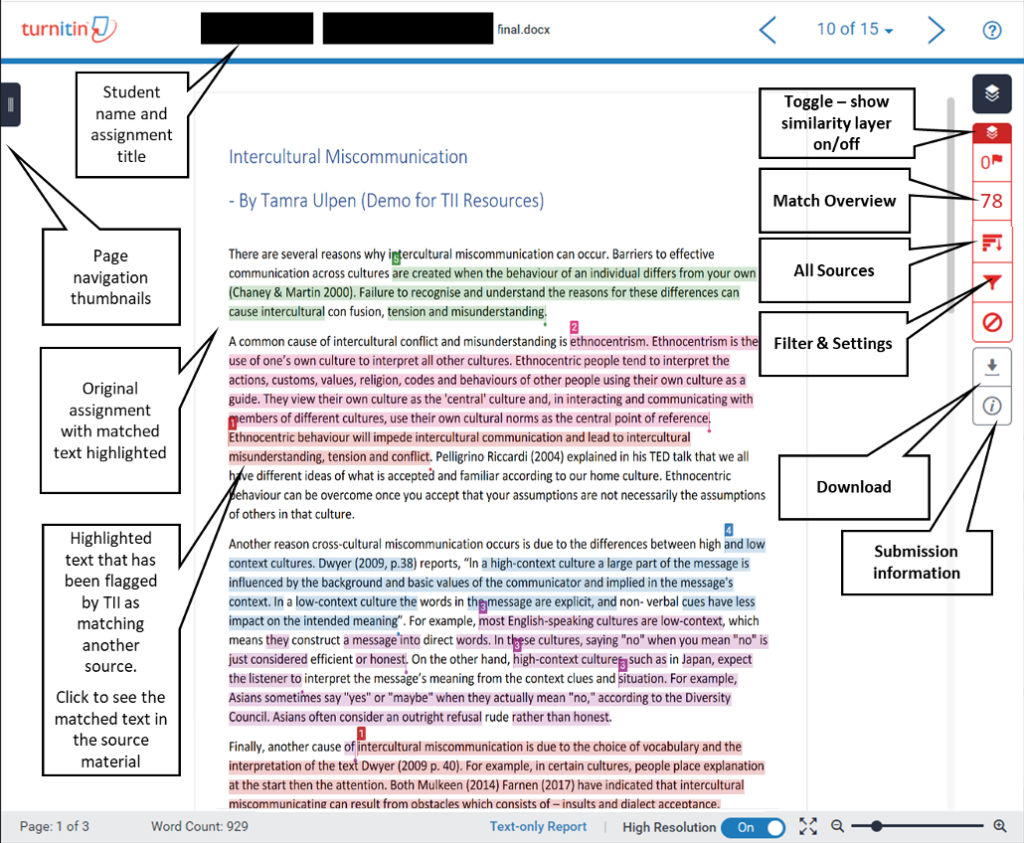
Turnitin uses color coding in its AI report. Cyan highlights indicate text the system believes is likely AI-generated. Purple highlights indicate text that appears to be AI-generated and then paraphrased. Gray dashes mean the system could not process that portion of the submission, usually because the text was too short, formatted as a list, or written in an unsupported language.
Can You Beat Turnitin by Rewriting?
Students ask this constantly. The honest answer is that light editing does not work well. If you paste ChatGPT output into your paper, then swap a few synonyms and change some sentence openings, Turnitin will probably still flag it. The underlying statistical patterns remain.
Heavy rewriting works better. When you genuinely re-express ideas in your own voice, add personal analysis, and insert specific examples from your course materials, the text breaks out of the predictable patterns AI produces. But here is the catch. If you rewrite the text that thoroughly, you did not really save any time. You might as well have written it yourself from the start.
What Backfires
Using so-called “AI humanizers” or paraphrasing tools like QuillBot often makes things worse. These tools are designed to evade detection, but they do it by introducing odd phrasings and unnatural synonym swaps. The result is text that feels robotic in a different way. Turnitin has a specific layer for AI-paraphrased content, and these tools sometimes trigger it more aggressively than raw ChatGPT output.
How to Check Your Paper Before You Submit
Here is the problem. Students cannot access Turnitin’s AI checker directly. It is locked behind instructor accounts. You cannot run an official Turnitin check on your own draft before submission unless your institution gives you access through a specific portal.
That leaves you guessing. You can use third-party AI detectors like GPTZero to get a rough sense of your text’s patterns, but those tools are not Turnitin. They use different algorithms and can give you misleading confidence.
If you want certainty, you need to see an actual Turnitin report. That is where services like AnswersFountain come in. You can submit your draft and receive a full Turnitin report that includes both the similarity score and the AI writing percentage. You see exactly what your professor will see. If something is flagged, you still have time to fix it.
Running a real Turnitin check before your final submission is the only way to know where you stand. Guessing leads to panic. Data leads to decisions.
Frequently Asked Questions
Does Turnitin detect ChatGPT 4 and newer models?
Yes. Turnitin updates its detection models regularly to account for newer GPT versions. As of 2026, it detects GPT-4o output at a 96% rate. The company continues to retrain its systems as AI models evolve.
Can Turnitin detect AI if I paraphrase everything?
Partially. Turnitin has a separate AI-paraphrasing detection layer. Light paraphrasing usually gets caught. Heavy, genuine rewriting in your own voice reduces detection risk, but if you rewrite that extensively, you have effectively written the content yourself.
Is a 25% similarity score bad?
Not necessarily. Similarity score and AI score measure different things. A 25% similarity score might mean you have properly cited quotes, common phrases in your field, or a bibliography that matches standard formats. Look at what is flagged, not just the number.
Will my professor automatically fail me if Turnitin shows a high AI score?
Most universities treat the AI score as one piece of evidence, not a smoking gun. Turnitin explicitly states that its AI indicator should not be the sole basis for adverse action against a student. Professors are supposed to review the flagged sections and consider the context before making any decisions.
Does Turnitin save my paper forever?
Turnitin stores submissions in its database according to your institution’s settings. Some schools add student papers to the repository. Others keep submissions private. The AI analysis happens within Turnitin’s system and does not share your data with outside parties.
Can I check my own Turnitin AI score before submitting?
Not through Turnitin directly. The AI checker is only available to institutions. If you need to see your AI score and similarity score before the deadline, use a service that provides official Turnitin reports. That is the only way to preview exactly what your instructor will see.
The Bottom Line
Turnitin detects ChatGPT. It detects Claude, Gemini, and most other major AI writing tools too. The system is especially good at catching raw, unedited AI output. But it is not perfect. It struggles with mixed human-AI text. It generates false positives, particularly for ESL students and formal academic writing. And it cannot tell your professor which tool you used or when you used it. It only estimates probability based on patterns.
The smartest approach is not to play cat-and-mouse with the algorithm. It is to understand what the algorithm measures, check your work with a real Turnitin report before submission, and write in a way that only you can write. Add your own examples. Vary your sentence length. Include references to specific class discussions. Make the text unmistakably yours.
If you want peace of mind before you hit submit, run a full Turnitin check through AnswersFountain. See the AI score. See the similarity score. Fix what needs fixing. Then submit with confidence.