

Check your paper before Turnitin submission. Learn how to manage your Turnitin score check and handle AI detection in 2026 for a stress-free submission.
The pressure of hitting the submit button on a major assignment is something every student understands. You have spent weeks researching, drafting, and citing, but there is still that nagging fear that the final Turnitin check might flag something you missed. In 2026, the stakes are even higher. Academic integrity tools have moved beyond simple copy-pasting detection. They now analyze your writing style, your rhythm, and even the speed at which you typed your paper.
Getting a low similarity score is no longer the only goal. You also have to manage AI detection scores that can sometimes be unpredictable. To help you stay ahead, I have put together a guide on how to audit your work before your professor sees it. By following these steps, you can feel confident that your work is original and reflects your own voice.
Understanding the Modern Turnitin Score Check
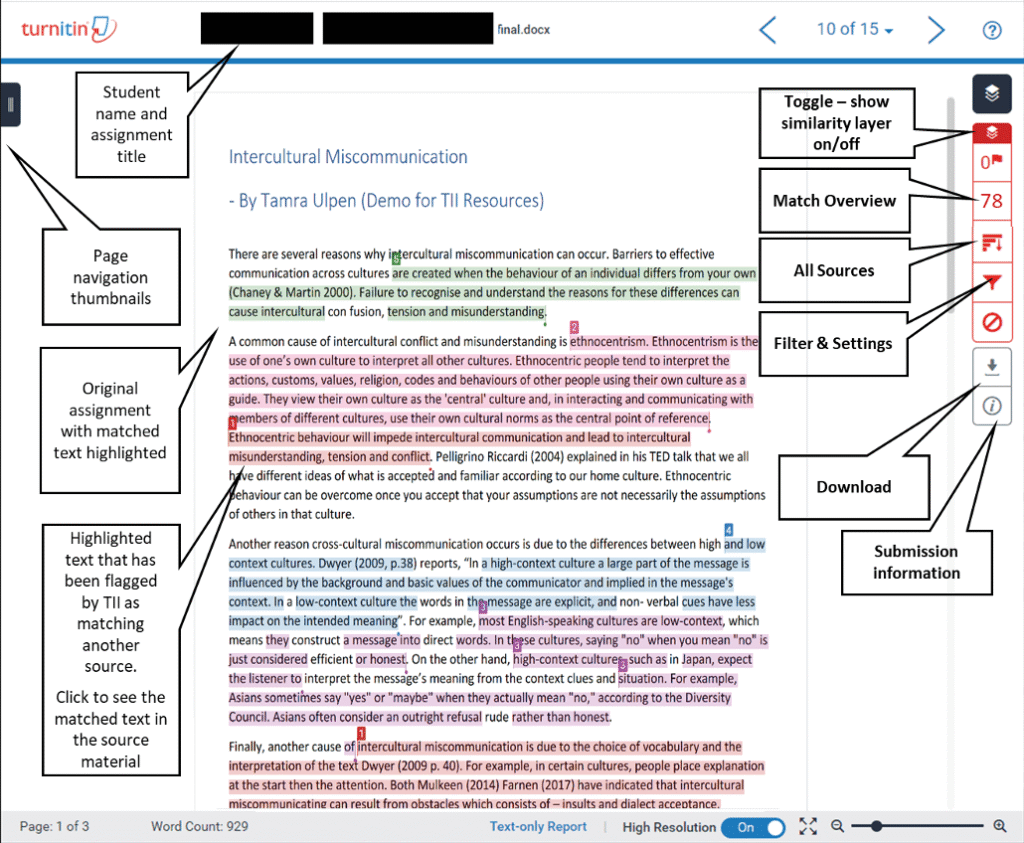
The first thing to understand is that the Turnitin score check is a two-part process. Most people focus on the similarity report, which shows how much of your text matches existing sources in their massive database. This includes journals, websites, and other student papers. However, the second part of the report is now just as important: the AI writing indicator.
In 2026, Turnitin has updated its algorithms to catch not just raw AI output, but also text that has been “humanized” by AI paraphrasing tools. If you use a tool to rewrite a paragraph, Turnitin might highlight that section in purple. This indicates that while the words are different, the underlying logic and structure still look like machine-generated patterns. Understanding these two distinct scores is the first step toward a successful submission.
The Difference Between Plagiarism and AI Detection
It is a common mistake to think that a 0% similarity score means your paper is safe. Plagiarism and AI generation are two different problems. Plagiarism happens when you use someone else’s ideas or words without credit. AI detection happens when your writing style is too predictable for a human.
If you write a paper entirely by yourself but use a very stiff, formal style, you might end up with a high AI score even if your similarity score is zero. This happens because AI models are trained on academic data. They love using words like “moreover” or “consequently” at the start of every sentence. If your writing mimics this robotic consistency, the detector might flag you. You need to check for both types of issues before you upload your file to the official portal.
New Features: How Turnitin Clarity Tracks Your Writing Process
One of the most significant updates in 2026 is a product called Turnitin Clarity. Many universities have started using this to get a transparent view of how a student actually wrote their paper. Instead of just looking at the final document, Clarity can track things like “low writing time” or “pasted text flags.”

Check before you submit. Get Turnitin Score Report in 15 Minutes.
Don't risk the 'Red' score. Get the exact same Turnitin report your supervisor uses. You will receive a full PDF similarity report including AI detection.
If you copy a large block of text from a website and then spend hours manually changing every third word, Clarity might flag the fact that the text was pasted in all at once rather than typed out naturally. It also looks for “low modification flags,” which occur when a student uses an AI assistant to “improve” their writing but only makes minor changes. To pass this check, you should do most of your composing directly in your word processor and avoid large-scale copying and pasting.
Manual Tactics to Check Your Paper
Before you even look at a software tool, there are several manual ways to check your paper for potential flags. These methods rely on your own intuition and an understanding of how these detectors think.
Breaking the AI Rhythm with Burstiness
Detectors look for a concept called “burstiness.” Human writers are chaotic. We might write a long, flowing sentence that explores a complex thought, followed immediately by a short, punchy one. AI, on the other hand, tends to be very uniform. It often produces sentences that are roughly the same length and follow the same “Subject-Verb-Object” structure.
To check for this, look at your paragraphs. If every sentence looks about the same size on the page, you might have a rhythm problem. Try to combine some sentences or break others apart. Adding personal anecdotes or specific examples from your class lectures can also help. AI usually cannot replicate a specific story your professor told during a Tuesday morning session.
Increasing Perplexity through Specificity
Another metric used in AI detection is “perplexity.” This measures how predictable your word choices are. If a computer can easily guess the next word in your sentence, your perplexity is low. This often happens when you use generic academic phrases.
Instead of saying “The results were very significant for the study,” try being more specific. Say something like “The data showed a 12% jump in engagement, which surprised the research team.” By using specific numbers, niche terminology, and varied vocabulary, you make your writing less predictable for an algorithm.
The Dangers of AI Paraphrasing
In the past, many students used word spinners to change a few words in a plagiarized paragraph to bypass the similarity check. In 2026, this is a losing strategy. Turnitin now specifically identifies “AI-generated text that was AI-paraphrased.”
These sections appear in a purple highlight in the report. The algorithm is now smart enough to see that the sentence structure remains identical to a known AI output, even if the vocabulary has been swapped. If you find yourself leaning too heavily on a paraphrasing tool, stop. It is much safer to read the source material, look away from the screen, and explain the concept out loud. Then, write down what you just said. This is the most effective way to keep your Turnitin score check within the safe range.
Best Third-Party Tools for a Pre-Submission Scan
You should never submit your paper blindly. There are several tools available that can give you a “pre-check” before the official submission. These tools can help you identify matches or AI patterns that you might have missed during your first draft.
| Tool Name | Primary Use | Why Use It? |
| Grammarly Similarity | Basic Plagiarism | Good for catching accidental matches with web content. |
| PlagiarismCheck.org | Student Alternative | Does not save your paper to a repository, which is vital. |
| Lynote | AI Detection Diagnostic | Useful for seeing if your natural writing style looks “robotic.” |
| MS Word Editor | Similarity & Grammar | Built-in tool that checks your work against millions of web pages. |
When you use these tools, make sure you choose the “non-repository” option if it is available. You do not want your paper to be saved into a database. If it is saved, when your professor runs the official Turnitin check, it might show a 100% match against your own pre-check submission. This is a nightmare to explain to a faculty member.
Correcting the Similarity Score Without Changing Meaning
If your pre-check reveals a high similarity score, you do not necessarily need to delete your work. Often, the issue is how the information is presented. High scores usually come from three places: long direct quotes, common phrases, or “patchwriting.”
Patchwriting is when you stay too close to the original source’s sentence structure while swapping out synonyms. To fix this, you must engage in structure-level rewriting. Move the end of the sentence to the beginning. Change the voice from passive to active. For example, instead of saying “It was argued by Smith that the policy failed,” say “Smith argued that the policy failed because of poor implementation.” This simple shift changes the signature of the sentence and lowers your Turnitin score check results.
Why a Zero Similarity Score Isn’t Always the Goal
It might sound strange, but a 0% similarity score can sometimes look suspicious to a professor. In academic writing, you are expected to cite other people’s work. If your paper has absolutely zero matches, it might suggest that you did not do any research or that you used a service to “scrub” the paper of all common academic phrases.
A healthy similarity score is usually between 5% and 15%. This usually accounts for your bibliography, properly cited quotes, and standard technical terms. If your report shows matches in your references section, do not panic. Most instructors know how to exclude the bibliography from the final count. Focus on the matches within your main body paragraphs. Those are the ones that actually affect your grade.
The Formatting Checklist for 100% Originality
Proper formatting is a simple way to keep your report clean. Turnitin is designed to ignore certain types of text if they are formatted correctly. If you follow these rules, you can significantly reduce the “noise” in your report.
- Use Block Quotes for Long Passages: If a quote is longer than 40 words, format it as a block. Turnitin is better at recognizing these as intentional citations.
- Check Your Quotation Marks: If you forget a single set of quotation marks, the system will flag the text as unoriginal. Make sure every ” and ” has a partner.
- Standardize Your Citations: Stick to one style, like APA or MLA. If your citations are messy, the system might not recognize them as references, leading to a higher similarity score.
- Use Tables for Data: If you have to list a lot of facts or numbers, putting them in a table can sometimes help. Turnitin’s AI detection is currently less effective at analyzing text inside tables and bullet points.
The Role of Human Editing in 2026
No matter how many tools you use, the best way to check your paper before a Turnitin submission is to have a human look at it. A human editor can spot things that an algorithm cannot. They can tell if your argument flows logically or if you have started to repeat yourself.
If you are worried about your AI score, ask a friend to read a paragraph. If they tell you it sounds a bit “dry” or “stiff,” that is a sign that a detector might flag it. Real human writing has personality. It has a voice. It has the occasional slightly long sentence that ends with a surprising point. If you remove all of that in an attempt to be “perfectly academic,” you might actually be making your paper look more like an AI generated it.
Handling False Positives in AI Detection
If you wrote your paper honestly but a pre-check tool like Lynote says it is 40% AI, do not freak out. False positives are common, especially for students who are non-native English speakers or those writing in highly technical fields like medicine or law.
In these cases, the “fix” is to add more “human” markers. Use a personal example to illustrate a point. Instead of saying “Many patients feel anxious,” you could say “In my own observations, patients often show signs of anxiety during the initial consultation.” This shift to the first person is a strong signal to detectors that a human is behind the keyboard.
Final Checklist Before You Upload
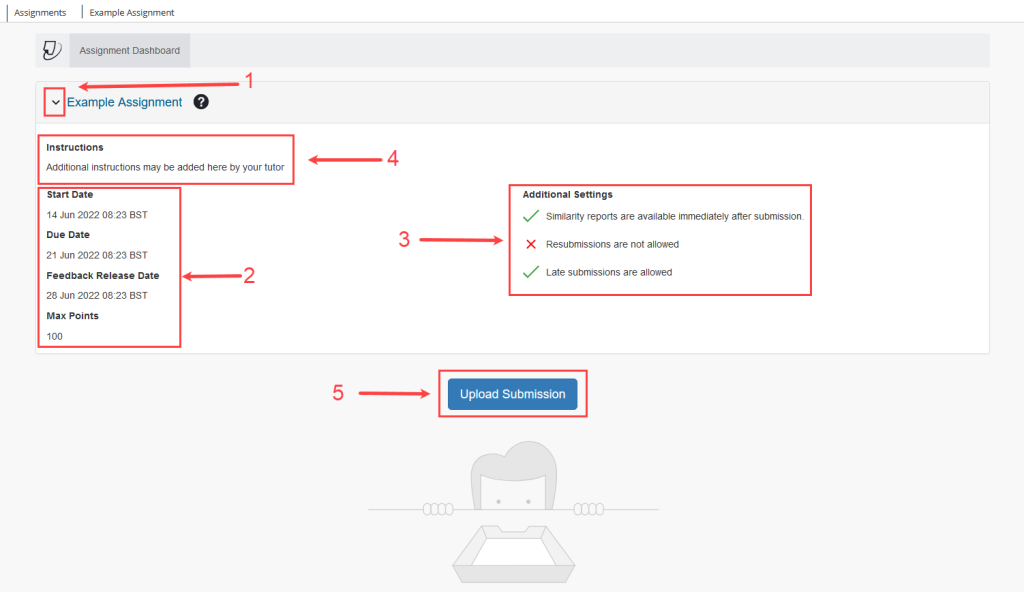
Before you take that final step and upload your document to your university portal, go through this quick list. It could be the difference between an easy grading process and a meeting with the academic integrity board.
- Did you check the file format? Some instructors require PDFs, while others want Word docs. Turnitin can sometimes behave differently depending on the file type.
- Are the references included? Make sure you did not accidentally leave off your bibliography.
- Is the “Similarity” vs “AI” score balanced? If one is very high, investigate why.
- Have you read it out loud? This is the best way to catch weird phrasing that might look like AI.
- Did you use a non-repository checker? Confirm your work was not saved to a public database.
Checking your paper for a Turnitin submission does not have to be a source of constant stress. If you treat the process as a final polish rather than a way to “beat the system,” you will find that your writing improves naturally. By focusing on your own voice, using specific examples, and leveraging the right tools, you can submit your work with total peace of mind.