

Can professors see everything on Turnitin? Learn what instructors actually view, including similarity scores, AI detection, and hidden reports.
Can Professors See Everything on Turnitin? Full Breakdown
If you’ve ever submitted an assignment through Turnitin, you’ve probably wondered what your instructor actually sees. This matters, especially if you are trying to pass a Turnitin check without surprises.
Let’s answer it directly.
No, professors do not see everything about how you wrote your paper.
But they do see a lot about the final document you submit, including detailed reports that you might not have access to.
This guide breaks it down clearly so you know exactly what shows up on their screen, what stays hidden, and how it affects your Turnitin score check and AI detection results.
What Turnitin Actually Shows Professors
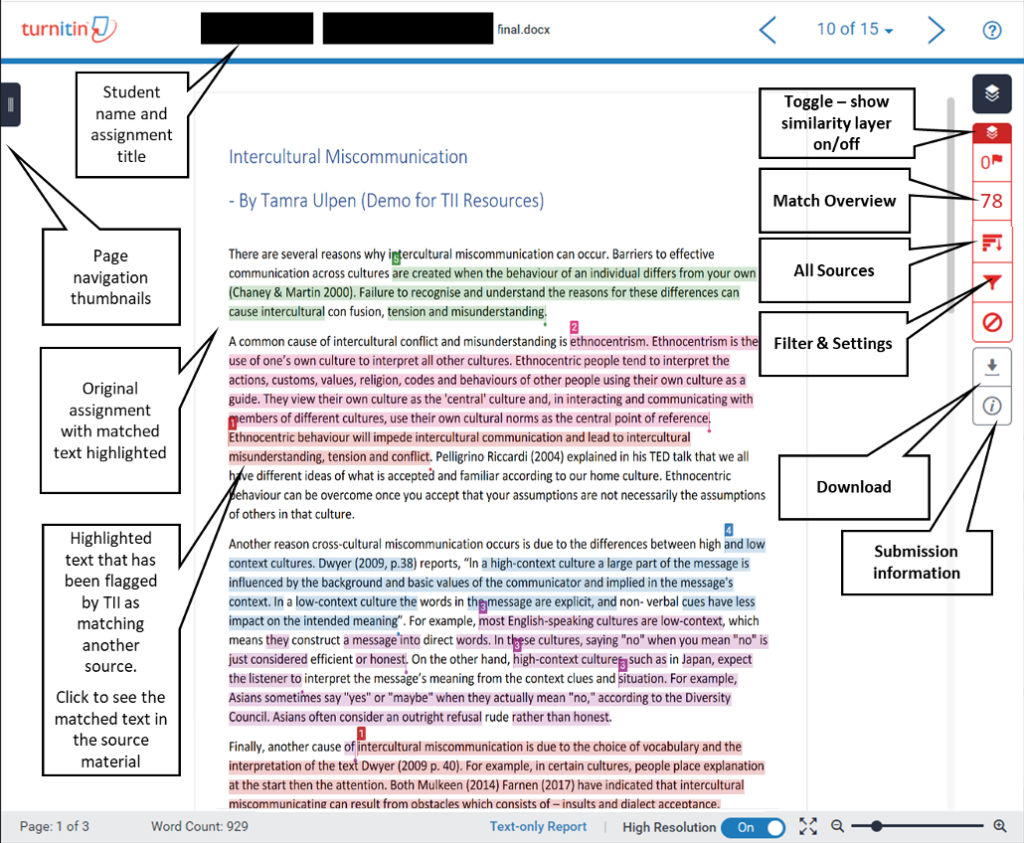
When your professor opens your submission, they don’t just see a percentage. They see a full report with multiple layers of data.
Here is what is typically visible.
1. The Similarity Report (Turnitin Score Check)
This is the most common part of any Turnitin check.

Check before you submit. Get Turnitin Score Report in 15 Minutes.
Don't risk the 'Red' score. Get the exact same Turnitin report your supervisor uses. You will receive a full PDF similarity report including AI detection.
It includes:
- Similarity percentage
- Highlighted text matches
- Original sources linked to each match
- Breakdown of matched content by source
The similarity score shows how much of your paper matches existing content in Turnitin’s database, including:
- Academic journals
- Websites
- Previously submitted student papers
Important point. A high score does not automatically mean plagiarism. Professors usually open the report and review the context.
2. Source Matching Details
Your instructor can click into each highlighted section and see:
- Exact sentences that match other sources
- Where the content came from
- How much of the source overlaps with your text
This means they can quickly tell the difference between:
- Properly cited references
- Common phrases
- Poor paraphrasing
This is where many students get caught. Even rewritten content can still show patterns of similarity.
3. AI Writing Detection Report
This is where things get more serious.
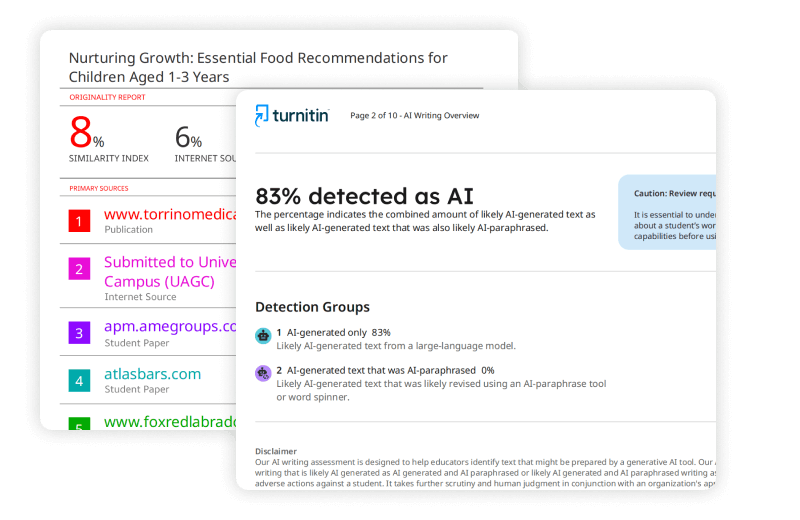
Turnitin now includes an AI detection feature that flags text likely generated by tools like ChatGPT.
Here’s what professors can see:
- AI percentage score
- Highlighted AI-generated sections
- Breakdown of AI-generated vs AI-paraphrased text (Turnitin Guides)
The AI score is separate from your similarity score. Many students confuse the two.
Also important:
- AI detection is not always visible to students
- It depends on your school’s settings
- In most cases, only instructors can access it
4. Submission Metadata
Professors can also view basic submission details like:
- File name
- Submission date and time
- Word count
- File type
This may seem minor, but it helps instructors track deadlines and identify unusual submissions.
5. Feedback and Grading Tools
Turnitin also includes built-in grading tools.
Your professor can:
- Leave inline comments
- Highlight sections
- Attach rubrics
- Assign grades
These are visible to you after grading, but the evaluation process itself happens on their side.
What Professors Do NOT See on Turnitin
This is where many students get confused.
Turnitin does not monitor your writing process. It only analyzes the final document.
Here’s what remains hidden.
1. Your Drafts or Writing History
Turnitin cannot see:
- Earlier versions of your paper
- Google Docs history
- Edits or revisions
It only checks what you upload.
2. AI Prompts or Chat History
If you used AI tools, Turnitin cannot see:
- Prompts you entered
- Conversations with AI
- External tools used
It only evaluates the text itself.
3. Your Screen Activity or Keystrokes
Turnitin does not track:
- Typing behavior
- Copy-paste actions
- Browser activity
Some newer educational tools experiment with this, but standard Turnitin reports do not include it.
4. External Files or Sources You Read
Your research process is invisible.
Turnitin does not know:
- What articles you opened
- Which books you used
- How you gathered information
It only checks for textual matches against its database.
Can Students See the Same Turnitin Report?
Short answer, not always.
What you see depends on your instructor’s settings.
Typical access levels:
| Feature | Student Access | Professor Access |
|---|---|---|
| Similarity score | Sometimes | Yes |
| Source matches | Sometimes | Yes |
| AI detection score | Rarely | Yes |
| AI highlights | Rarely | Yes |
Many students only see a partial Turnitin score check, while professors see the full breakdown.
This creates a gap. You might submit your paper without knowing exactly what your instructor will see.
Why Professors Care About the Full Report
Your professor is not just looking at a percentage.
They are usually trying to answer three questions:
- Is this work original?
- Are sources properly cited?
- Was AI used inappropriately?
That’s why they often open the detailed report instead of relying on the number alone.
Even Turnitin itself states that AI detection should not be used as the only basis for decisions, and requires human judgment. (Turnitin Guides)
Understanding Turnitin Scores Properly
Many students panic when they see numbers. Let’s simplify.
Similarity Score Guide
- 0 to 10 percent: Mostly original
- 10 to 20 percent: Acceptable in most cases
- 20 to 40 percent: Needs review
- 40 percent and above: High similarity
But context matters more than the number.
For example:
- A well-cited paper can still have 25 percent similarity
- A poorly paraphrased paper can have 15 percent but still raise concerns
AI Detection Score
This is different.
- It estimates how much text looks AI-generated
- It does not prove misconduct
- It can produce false positives
Also, if the score is very low, Turnitin may not show detailed highlights to avoid misinterpretation.
Common Misconceptions About Turnitin
Let’s clear a few things up.
“Turnitin can see everything I did”
False. It only analyzes your final submission.
“A low similarity score means I am safe”
Not always. You can still get flagged for AI or poor paraphrasing.
“Professors only look at the percentage”
Some do initially, but most serious cases involve reviewing the full report.
“AI detection is 100 percent accurate”
No. Even Turnitin admits it can make mistakes and requires human review.
How to Pass a Turnitin Check Safely
If you want a clean Turnitin score check, focus on these practical steps.
Write in your own voice
Avoid copying or over-relying on tools that rewrite content.
Cite everything properly
Use correct referencing styles like APA, MLA, or Harvard.
Avoid heavy paraphrasing tools
AI paraphrasing can still trigger both similarity and AI detection.
Review your similarity before submission
If possible, check your report early and revise.
Keep your drafts
If questioned, you can show your writing process.
Why Many Students Use Pre-Submission Turnitin Checks
Because of limited visibility, many students want to see the same report their professor sees.
That includes:
- Full similarity report
- AI detection score
- Highlighted sections
This helps you:
- Fix issues before submission
- Reduce anxiety
- Submit with confidence
That is exactly what AnswersFountain offers.
Get the Same Turnitin Report Your Professor Sees
At AnswersFountain.com, you can run a full Turnitin check before submitting your paper.
You get:
- Official Turnitin similarity report
- AI detection report
- Source breakdown with highlights
- Fast results
This gives you full clarity before your professor reviews your work.
Final Answer: Can Professors See Everything on Turnitin?
No, but they see enough to evaluate your work thoroughly.
They can access:
- Similarity score and matched sources
- AI detection results
- Detailed breakdown of flagged content
They cannot access:
- Your drafts or writing process
- AI prompts or chat history
- Your activity outside the document
So while Turnitin does not track everything, it provides enough insight for professors to make informed decisions.
Bottom Line
If you treat Turnitin as a simple percentage tool, you will miss the bigger picture.
Your professor sees:
- Context, not just numbers
- Patterns, not just matches
- Signals, not proof
The smartest move is simple.
Write clearly, cite properly, and check your work before submission.
If you want full visibility into your Turnitin check, use a trusted pre-check service and avoid submitting blind.